
So you just bought your first ADA on an exchange, or you want to start staking Cardano — the first and most important step is to create a non-custodial (self-custody) wallet. If you are brand new to the ecosystem, read getting started with cardano first to understand what ADA actually is. No locks, no middlemen: you hold the keys, you make the decisions. This complete guide walks you through exactly how to set up a cardano wallet from zero — a safe wallet with your seed phrase backed up and staking delegated — with step-by-step diagrams, Vietnam-specific context, and a security checklist.
This cardano wallet setup guide is written for absolute beginners. By the end, you will know how to create an ada wallet, secure your 15-word recovery phrase, receive and send funds, and start earning staking rewards — all in under 30 minutes.
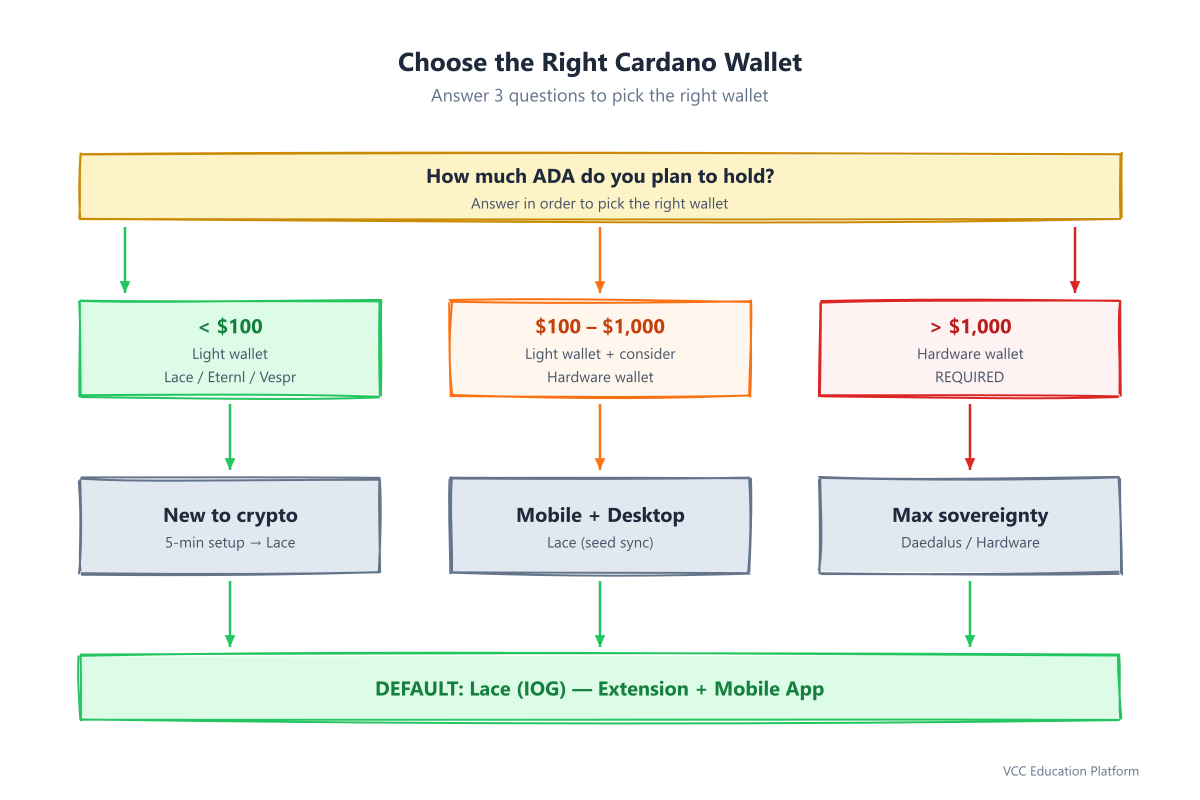
Figure 1: Choose the right Cardano wallet with a 3-question decision tree
Why Your Wallet Choice Matters
"Not your keys, not your coins." If an exchange holds your seed phrase, it holds your money. Learn more about why what is cryptocurrency and decentralization put you in control.
| Wallet type | Who holds the keys (seed phrase) | Risk |
|---|---|---|
| Exchange (Binance, OKX, Remitano...) | The exchange | Exchange collapse, freeze, hack → lost funds |
| Non-custodial wallet (Lace, Eternl, Daedalus, Ledger...) | You | You lose the seed phrase → funds lost forever (no one can recover them) |
In Vietnam, 2022–2024 saw local exchanges shut down with user funds frozen. A self-custody wallet removes that risk — but it puts 100% of the responsibility for protecting your seed phrase on you.
> Important 2026 update: The Yoroi wallet has shut down (EMURGO wound it down after a security incident and moved users to SecondFi). Do not use Yoroi anymore. This guide uses Lace (from IOG — the Cardano development team) as the default wallet for beginners.
Cardano Wallet Types Compared (2026)
| Wallet | Type | Security | Staking | Multi-account | Hardware wallet | Best for |
|---|---|---|---|---|---|---|
| Lace | Light (browser + mobile) | ★★★★★ | ✅ 1-click | ✅ | ✅ Ledger/Trezor | Beginners, all-rounder |
| Eternl | Light (browser + mobile) | ★★★★★ | ✅ Advanced | ✅ | ✅ Ledger/Trezor/Keystone | Power users, DeFi/NFT |
| Vespr | Light (mobile + browser) | ★★★★☆ | ✅ | ✅ | ✅ Ledger/Trezor | Mobile-first, great UX |
| Flint | Light (browser) | ★★★★☆ | ✅ | ✅ | ✅ Ledger | Developers, multi-account |
| Daedalus | Full node | ★★★★★ | ✅ | ✅ | ✅ Ledger/Trezor | Maximum sovereignty, >$1000 ADA |
| Ledger/Trezor | Hardware (cold) | ★★★★★ | ✅ (via wallet) | ✅ | N/A | Long-term, >$1000 ADA |
> Note: All light wallets (Lace, Eternl, Vespr...) do not download the blockchain — they sync in seconds. Daedalus downloads the entire blockchain (~20GB+, takes hours).
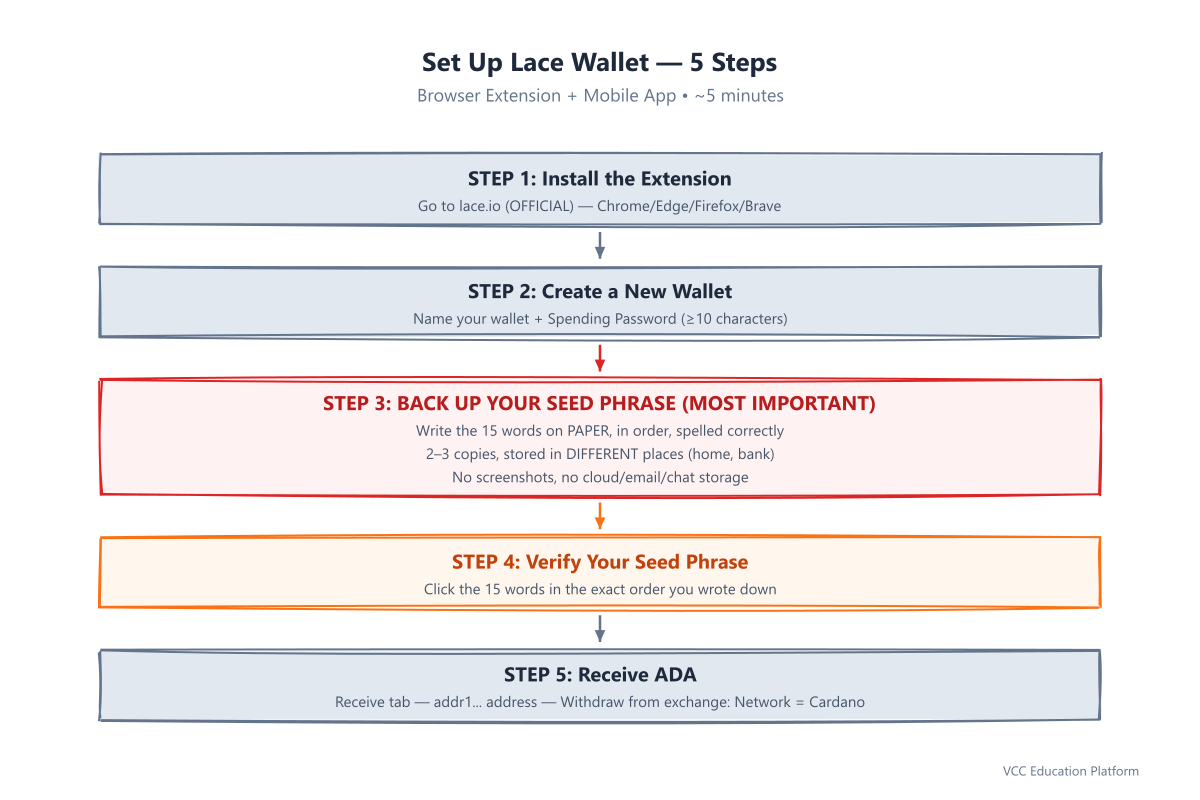
Figure 2: Set up Lace wallet in 5 steps
Step 1: Choose the Right Wallet — 3-Question Decision Tree
Answer three questions and you will know which wallet to use:
- How much ADA do you plan to hold?
- How technical are you?
- Which device is your main one?
Default recommendation for beginners: Lace — built by IOG (the Cardano developer team), open-source, audited, offers both a browser extension and mobile app, 1-click stake pool delegation, multi-account support, and hardware wallet integration.
Step 2: Set Up Lace (Browser Extension) — 5 Steps
2.1 Install the extension from the official site
- Go to lace.io — this site only
- Pick your browser: Chrome / Edge / Firefox / Brave → "Add to Chrome/Edge/Firefox/Brave"
- ⚠️ WARNING: Do not search "Lace" directly in the Web Store — fake extensions exist. Always start from the lace.io homepage.
2.2 Create a new wallet
- Click the Lace icon in the top-right of your browser → "Create new wallet"
- Name your wallet (e.g. "My main ADA wallet")
- Create a Spending Password — the password used every time you send a transaction
2.3 MOST IMPORTANT STEP: Back up your Seed Phrase (15 words)
Lace displays 15 English words (BIP39 standard). This is your master key — anyone with those 15 words can restore all your funds.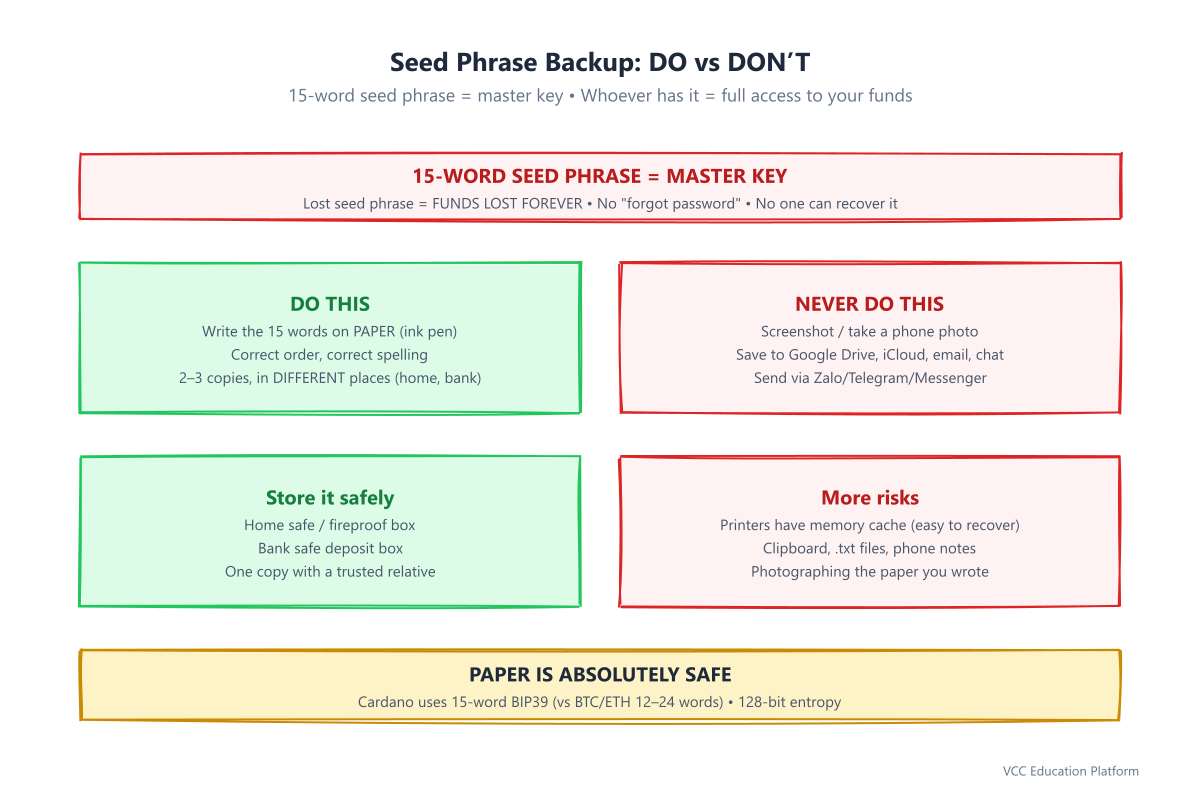
Figure 3: Seed phrase backup — paper is absolutely safe, digital is a risk
DO THIS (✅ Right now):
- Write all 15 words in the exact order on paper (ballpoint/ink pen, not pencil)
- Make 2–3 copies, stored in different places (e.g. one at home, one at the bank, one with a trusted relative)
- Double-check: word 1, word 2... word 15 — correct order, correct spelling
NEVER DO THIS (❌):
- Screenshot / take a phone photo
- Save to Google Drive, iCloud, OneDrive, Notion, email, or Zalo/Telegram/Messenger chats
- Copy to clipboard, save a text file, or use phone notes
- Print with a printer (printers have memory cache)
> Why 15 words? Cardano uses the 15-word BIP39 standard (unlike Bitcoin/Ethereum's 12/24 words). 15 words = 128-bit entropy — absolutely secure if kept secret.
2.4 Verify your seed phrase
Lace asks you to click the 15 words in the exact order you wrote down. This confirms you backed up correctly.- The screen shows 15–18 shuffled words → click word 1 through word 15 in order
- If you get it wrong → go back and re-check your notes
- Do not skip this step — it protects you from writing errors.
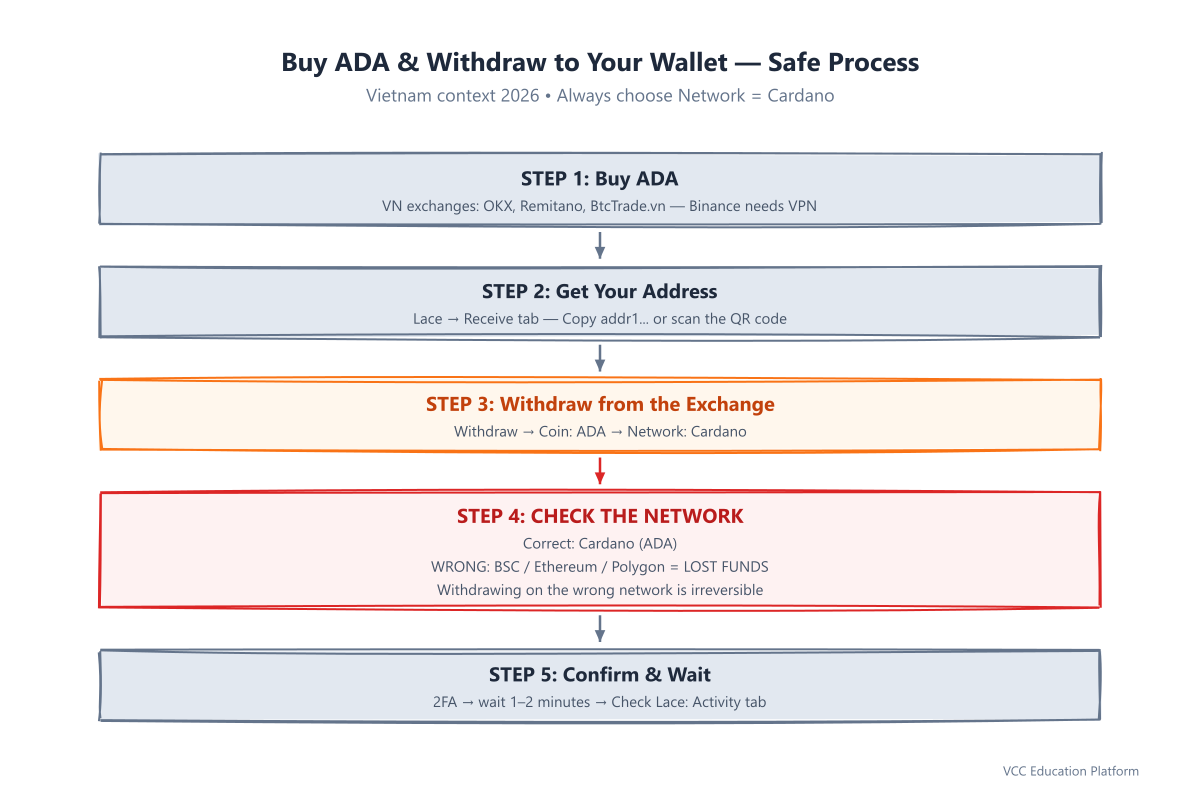
Figure 4: Buy ADA and withdraw to your wallet — always choose Network = Cardano
2.5 Receive ADA (address & QR code)
- Go to the "Receive" tab → your addr1... address appears (Cardano addresses always start with
addr1). See how to receive ADA for a dedicated walkthrough. - Copy the address OR scan the QR code
- Check: The address must start with
addr1— if it starts with0x...it is Ethereum,bc1...is Bitcoin → WRONG NETWORK
Step 3: Buy ADA and Withdraw to Your Wallet (Vietnam Context)
3.1 Exchanges supporting VND → ADA (2026)
| Exchange | Type | Direct VND | ADA withdrawal fee | Notes |
|---|---|---|---|---|
| OKX Vietnam | CEX | ✅ P2P/Spot | ~0.5–1 ADA | Good liquidity, Vietnam KYC |
| Remitano | P2P | ✅ Bank transfer | ~1 ADA | Long-standing reputation, higher fees |
| BtcTrade.vn | CEX | ✅ Spot VND/ADA | ~0.8 ADA | Vietnamese exchange, lower volume |
| Binance (Global) | CEX | ❌ (P2P via VND) | ~0.5 ADA | Needs VPN, international KYC |
For the full list, see exchanges supporting ADA.
3.2 How to withdraw to Lace
- On the exchange: choose "Withdraw" / "Rút" → Coin: ADA → Network: Cardano (NOT BSC, ETH, or Polygon)
- Paste the
addr1...address from Lace (Receive tab) - Enter the amount → Confirm (2FA email/SMS/Google Authenticator)
- Wait 1–2 minutes → Check the Lace "Activity" tab → "Received"
⚠️ LIFESAVER: Withdrawing on the wrong network (e.g. BEP20/BSC) → TOTAL LOSS OF FUNDS. Always check the network = Cardano.
Step 4: Send ADA (Test with a Small Amount)
Before sending large amounts, test with 1–2 ADA to another wallet or your second wallet.
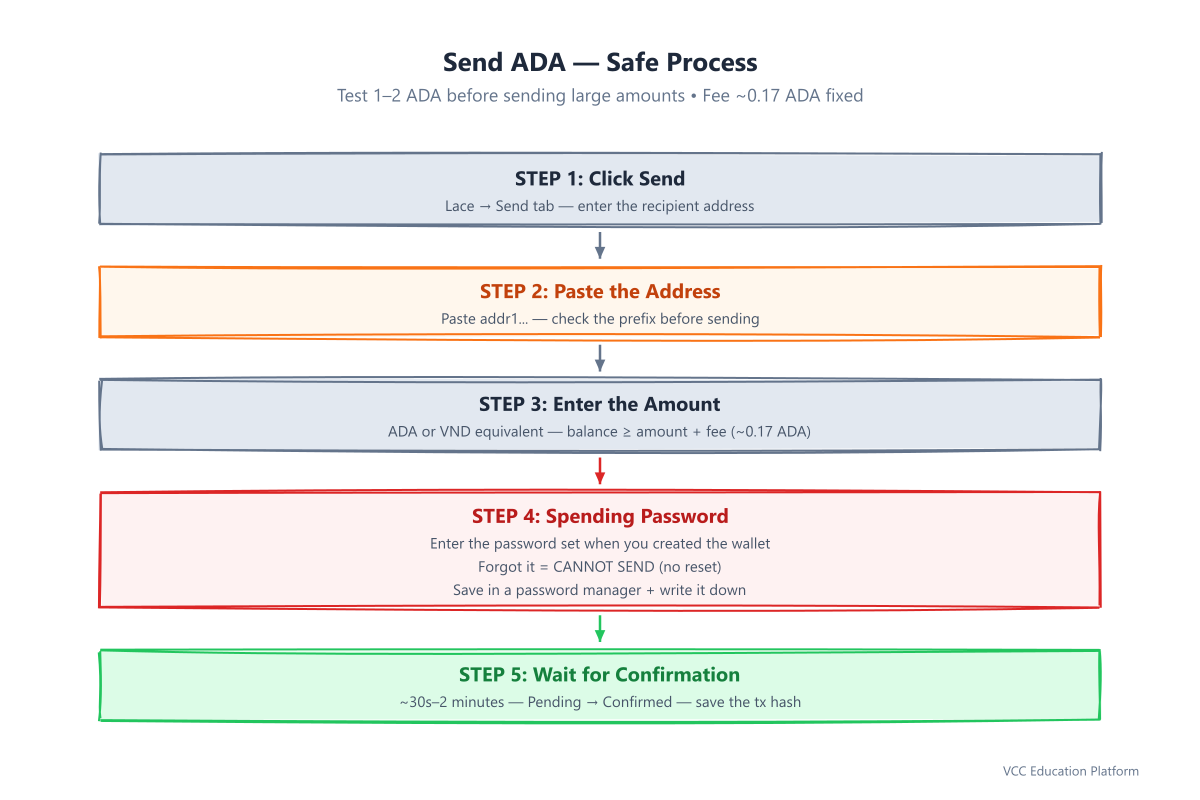
Figure 5: Send ADA — a safe, step-by-step process
- "Send" tab → Paste the recipient address (
addr1...) - Enter the amount (ADA or VND equivalent — Lace shows both)
- Check the fee: ~0.17 ADA (fixed by protocol, not wallet-dependent)
- Enter your Spending Password (from step 2.2)
- Review: recipient address, amount, fee → Confirm
- Wait for confirmation (~30 seconds–2 minutes) → Done
Step 5: Delegate Staking — Start Earning Rewards in 1 Click
Cardano staking = Delegate your ADA to a Stake Pool — your funds stay in your wallet, are not locked, and can be withdrawn at any time. For the economics behind it, see how staking rewards work.
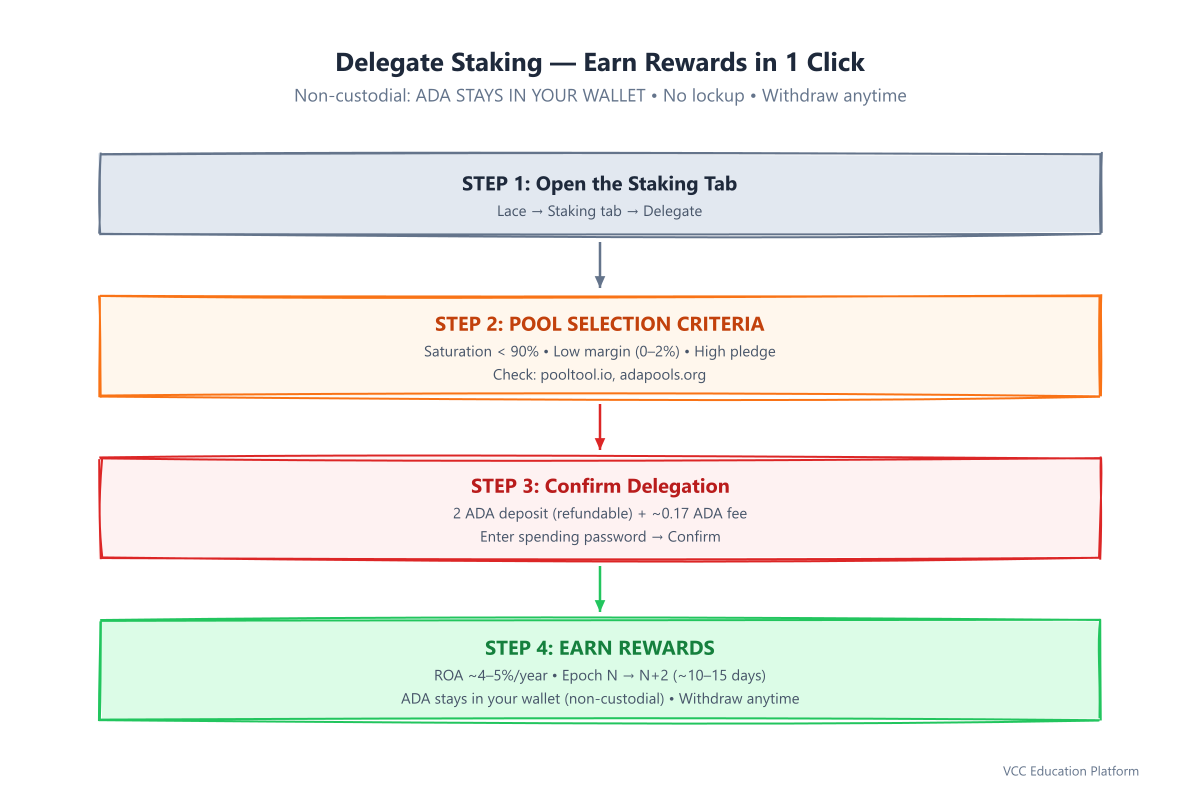
Figure 6: Delegate staking — earn rewards while your ADA stays in your wallet
5.1 Choosing a stake pool (criteria)
- Saturation < 90% — an over-full pool means lower rewards
- Low margin (pool fee) — 0–2% is good, >5% is poor
- High pledge — the operator stakes a lot themselves = more trustworthy
- Stable block production — few missed blocks
- Server location — closer to Vietnam (Singapore, Hong Kong, Japan) = lower latency
5.2 Delegate right in Lace
- "Staking" tab → "Delegate"
- Search for a pool by name or tick "Show all pools" → filter saturation < 90%
- Select a pool → "Delegate"
- Cost: 2 ADA deposit (refunded when you undelegate) + ~0.17 ADA fee
- Confirm with your spending password → Done
5.3 When do rewards arrive?
- Delegate in Epoch N → pool produces blocks in Epoch N+1 → rewards paid in Epoch N+2
- One epoch = 5 days → wait ~10–15 days for the first reward
- Real ROA (Return per Annum) is ~4–5%/year (depends on pool performance)
> Tip: Delegate right after setting up your wallet — it costs nothing, your funds stay usable, and rewards compound automatically.
Step 6: 7-Step Security Checklist (Do Immediately After Setup)
| # | Action | Done? |
|---|---|---|
| 1 | ✅ 15-word seed phrase written on paper, 2–3 copies, stored in different places | ☐ |
| 2 | ✅ Strong spending password, saved in a password manager + memorized | ☐ |
| 3 | ✅ Bookmarked: lace.io, eternl.io, daedaluswallet.io, ledger.com | ☐ |
| 4 | ✅ Tested sending/receiving 1–2 ADA successfully | ☐ |
| 5 | ✅ Delegated to a stake pool (saturation < 90%, low margin) | ☐ |
| 6 | ✅ Saved the delegated Pool ID / pool ticker (to check later) | ☐ |
| 7 | ✅ Joined the community: @CardanoVietnam (Telegram), Cardano Việt Nam (FB) | ☐ |
Common Beginner Mistakes (and How to Avoid Them)
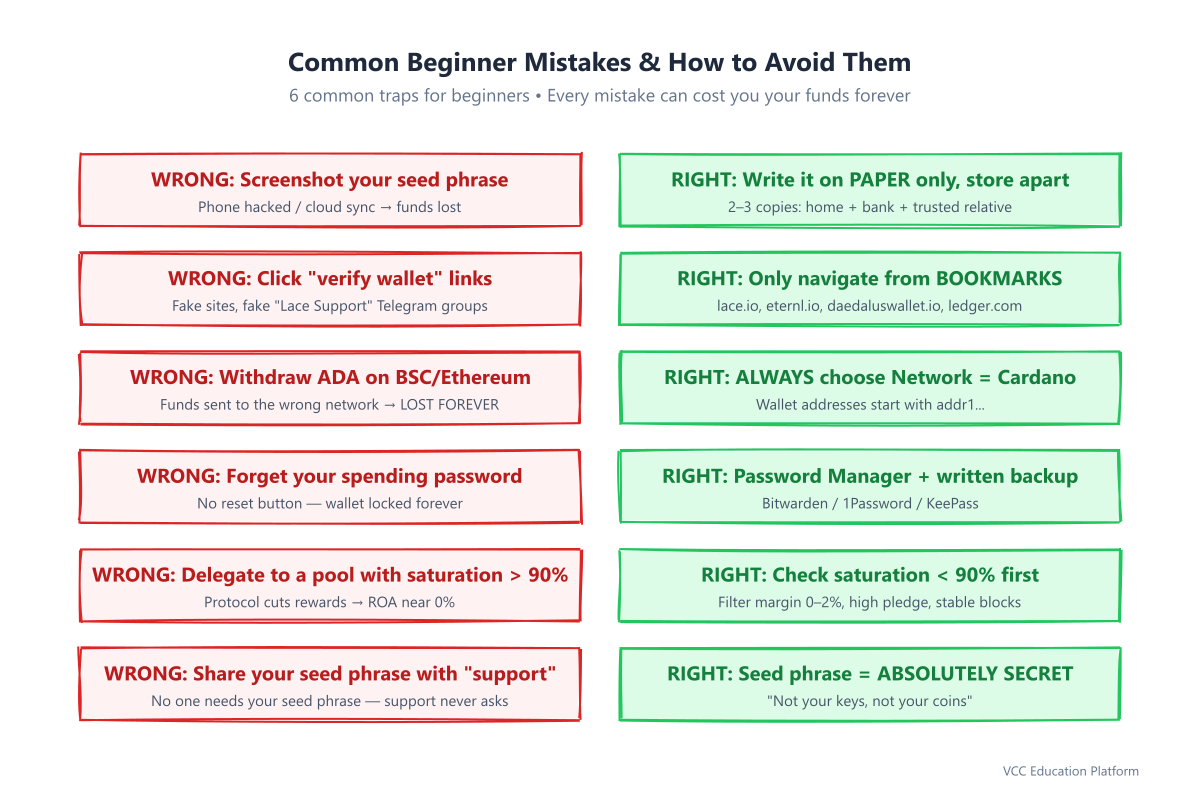
Figure 7: Common beginner mistakes and how to avoid them
| Mistake | Consequence | How to avoid |
|---|---|---|
| Screenshot your seed phrase | Hacker accesses cloud/phone → lost funds | Paper only |
| Clicking a "verify wallet" link from email/Zalo/Telegram | Phishing → you type your seed phrase → lost funds | Only navigate from bookmarks |
| Withdrawing ADA on BSC/Ethereum network | Funds lost forever (irreversible) | Always choose network = Cardano |
| Forgetting your spending password | Cannot send funds (no reset) | Password manager + paper |
| Delegating to a pool with saturation > 90% | Rewards drop sharply | Check saturation before delegating |
| Sharing your seed phrase with "support" | Never share it — support never asks for the seed phrase | Seed phrase = top secret |
> Vietnam reality: Many fake Telegram groups pose as "Lace Support Việt Nam" or "Eternl Việt Nam" — Lace/Eternl have no official Telegram support. Ask only on the official Discord or GitHub.
When Should You Upgrade Your Wallet?
| Situation | Recommendation |
|---|---|
| Holding > $1,000 ADA | Buy a Ledger Nano S Plus / Trezor Safe 3 (~$60–80) |
| Managing multiple accounts (separate wallets for DeFi, NFT, savings) | Use Lace or Eternl (multi-account) |
| Voting in Catalyst, running a full node | Daedalus |
| Building DApps, need multi-signature | Eternl + Hardware wallet |
Connecting a Hardware Wallet (Ledger) to Lace/Eternl
- Buy a Ledger from ledger.com or an official VN distributor (do NOT buy old stock from Shopee/Lazada)
- Set up the Ledger → install the latest firmware → install the Cardano App via Ledger Live
- In Lace/Eternl: "Connect Hardware Wallet" → choose Ledger → authenticate on the device
- Verify the address on the Ledger screen matches your wallet → Done
Quick Reference
| Topic | Details |
|---|---|
| Seed phrase | 15 English words (BIP39), write on paper, never digital |
| Spending Password | Password to send funds, min. 10 characters, save in a password manager |
| Receive address | Always starts with addr1... (Cardano mainnet) |
| Transaction fee | ~0.17 ADA (fixed by protocol) |
| Stake deposit | 2 ADA (refunded when you undelegate) |
| Staking rewards | ~4–5%/year, first reward after ~10–15 days, automatic compounding |
| Network when withdrawing | Cardano (not BSC, ETH, Polygon) |
| Community | @CardanoVietnam (Telegram), Cardano Việt Nam (FB) |
FAQ
Q: Can I use the same seed phrase in Lace and Eternl? A: Yes. The seed phrase is your master key. Import the seed phrase into another wallet and you restore the same wallet. Your funds are not duplicated — you are just viewing them through a different interface.
Q: What if I lose my seed phrase? A: Your funds are lost forever. There is no "forgot password" button and no support team can recover it. Your seed phrase is the only key.
Q: Are Lace/Eternl safe? A: Both are audited, open-source (Lace), and non-custodial. The biggest risk is you losing your seed phrase or entering your seed phrase on a fake website.
Q: Do I need ADA to create a wallet? A: No. Creating a wallet is free. You need ADA when: sending funds (~0.17 ADA fee) and delegating to stake (2 ADA deposit + fee).
Q: After delegating, can I still withdraw my funds? A: Any time. Undelegating returns your funds to your wallet immediately (minus the 2 ADA deposit, which is also refunded). No lockup.
Q: Why does my receive address change every time? A: Lace/Eternl generate a new address each time you receive (UTXO model) — they all belong to your wallet, and it is safer for your privacy.
Action Summary (Copy this checklist)
` [ ] 1. Go to lace.io → Install the Chrome/Edge/Firefox/Brave extension [ ] 2. Create a wallet → Name it → Set a spending password (save it in a password manager) [ ] 3. Write the 15-word seed phrase on PAPER (2–3 copies, stored in different places) [ ] 4. Verify the 15 words in Lace (click them in order) [ ] 5. Receive tab → Copy your addr1... address [ ] 6. Buy ADA on OKX/Remitano/BtcTrade → Withdraw to your addr1... address (Network: Cardano) [ ] 7. Test sending 1–2 ADA → confirm it arrives [ ] 8. Staking tab → Choose a pool with saturation < 90% → Delegate (2 ADA + fee) [ ] 9. Complete the 7-step security checklist (above) [ ] 10. Join @CardanoVietnam to stay updated and ask questions `
Updated: 2026-08-09 | Author: VCC Content Team | Technical review: [Cardano SPO/Developer] | Sources: Cardano Foundation, Lace/Eternl/Daedalus docs, Ledger Support
This article is educational and is not investment advice. Crypto is high risk — always do your own research (DYOR) and only invest what you can afford to lose.