
When you create your first Cardano wallet, the app displays 12 or 24 random English words. That is your seed phrase (recovery phrase) — the single master key that controls all of your ADA. Lose it and your funds are gone forever. There is no "forgot password," no tech support to bail you out. This guide teaches you how to back up safely, avoid costly mistakes, and prepare an inheritance plan for your loved ones.
What Is a Seed Phrase?
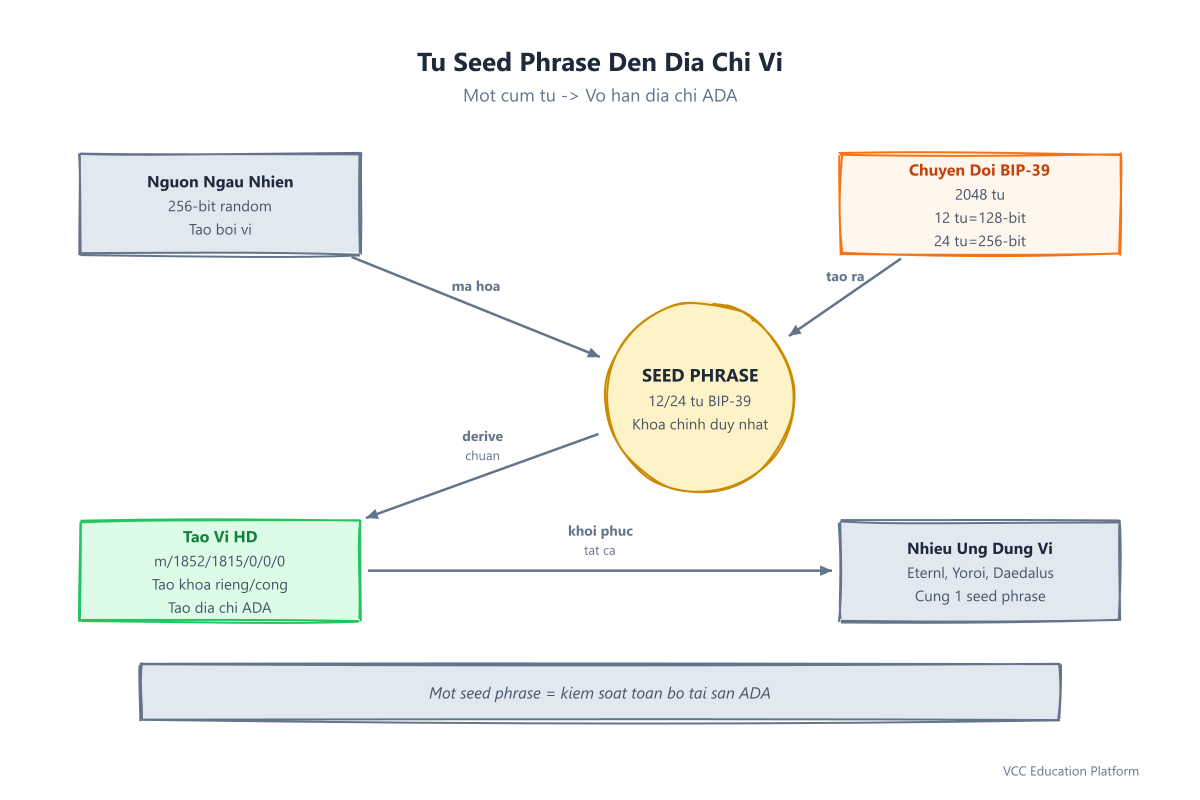
Think of a seed phrase as the master key to an apartment building. The building is your wallet, and each apartment is a receiving address for ADA. The master key (seed phrase) opens every apartment. Whoever holds that key owns everything inside.
Technically: When you create a wallet, the system generates a random 256-bit number (entropy). This is converted through the BIP-39 standard into 12 or 24 words from a standardized list of 2,048 English words. Each word represents 11 bits of data. 12 words = 128-bit security, 24 words = 256-bit security.
The key point: A seed phrase is NOT a private key. Private keys are derived from the seed phrase following the BIP-32/BIP-44 standards. Cardano uses the derivation path m/1852'/1815'/0'/0/0 (the CIP-1852 standard). One seed phrase → generates unlimited private keys → unlimited ADA receiving addresses.
One seed phrase recovers ALL wallets: Eternl, Yoroi, Daedalus, Lace, Ledger, Trezor. You only need to back it up ONCE.
Why Back Up Immediately?
A friend once shared this story: "I installed Yoroi on my phone and didn't back up my seed phrase. One day I dropped the phone in water and the screen went black. Bought a new phone, reinstalled Yoroi... the wallet was empty. 500 ADA gone." Stories like this happen every day.
Real-world risks:
- Lost or damaged devices: Dropping your phone, laptop failure, reinstalling your OS
- Floods and water damage: Storm season — paper gets wet, moldy, ink smears
- High humidity: 80-90% year-round in tropical climates — paper typically degrades in 2-3 years
- Multi-generational households: Family members may accidentally throw away, find, or lose your paper backup
- Holiday season: Theft rates spike — you need a secure hiding place
The golden rule: "Not your keys, not your coins" — if you don't hold the keys, the coins aren't yours. With a seed phrase, YOU are the bank. No one can save you except yourself.
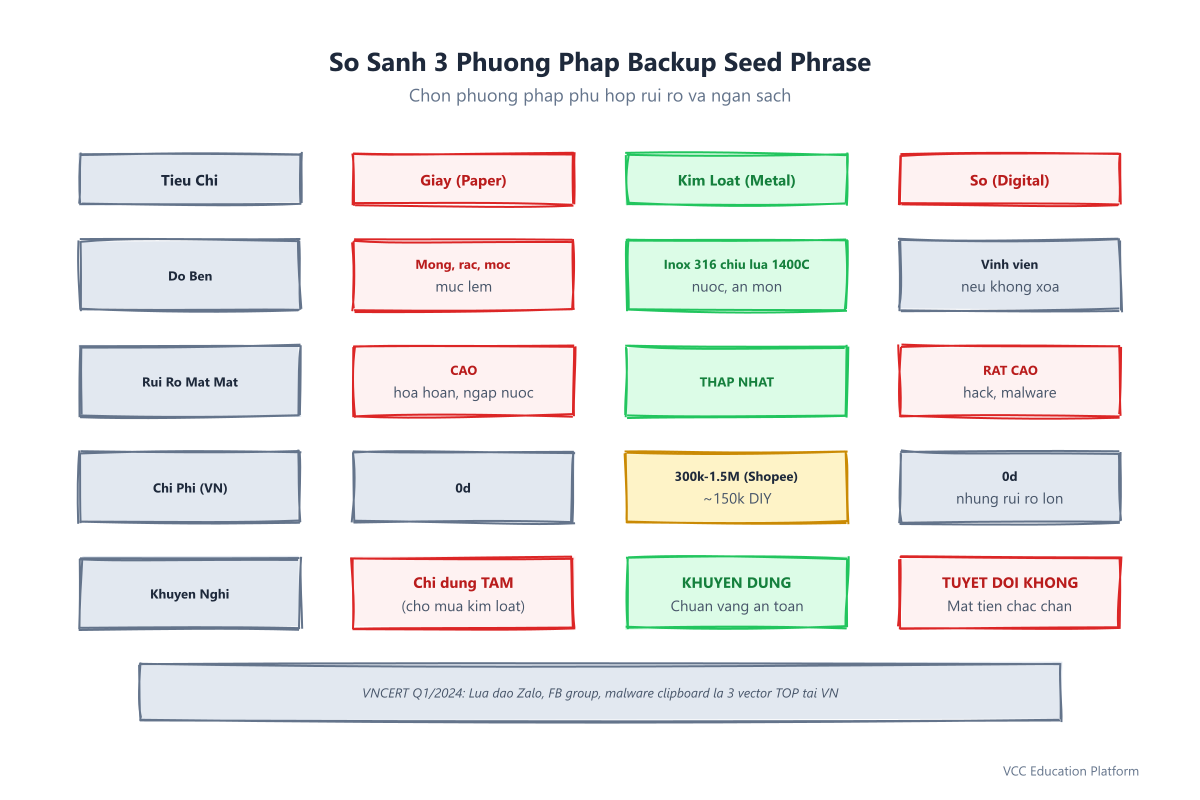
Comparison of 3 Backup Methods
| Method | Durability | Loss risk | Cost | Accessibility | Recommendation |
|---|---|---|---|---|---|
| Paper | Thin, tears, molds, ink smears | HIGH (fire, water, family throws it out) | $0 | Easy to write, easy to read | ❌ TEMPORARY only (while waiting for metal) |
| Metal | 316 stainless steel withstands 1400°C+, water, corrosion | LOWEST | $12-60 (retail) / ~$6 DIY | Requires stamping/engraving, but permanent | ✅ RECOMMENDED |
| Digital | Permanent (if not deleted) | VERY HIGH (hack, malware, cloud leak, keylogger) | $0 | Fast copy-paste | 🚫 NEVER |
Details of each method
Paper — Temporary use only
Write your 12/24 words on paper, check spelling 3 times. Store in a sealed plastic bag in a dry place. Critical weakness: Burns at 233°C, water smears the ink, humidity causes mold within a few years. When to use it? Only while waiting for your metal backup to arrive (1-2 weeks maximum).
Metal — The gold standard
- Buy ready-made online: Billfodl (~$20-30), Cryptosteel Capsule (~$48), Keyois (~$28). Search for "billfodl", "cryptosteel", "metal seed phrase backup".
- DIY for under $8: Buy a 316 stainless steel plate measuring 100x50mm (~$2), and a number stamping set 0-9 (~$4). Stamp each word onto the steel. Total cost ~$6. 316 stainless steel withstands fire better than common 201/304 grades.
- Process: Write each word → Check spelling → Stamp → Test recovery → Store in 2 separate locations (e.g., one at home, one in a bank safe deposit box or with a trusted relative).
Digital — NEVER
- Taking a photo saved to your gallery → iCloud/Google Photos auto-sync → hacker accesses your cloud = funds gone
- Saving in Notes, Google Keep, Email, messaging app "Saved Messages" → clipboard malware/keylogger can read it
- Password manager (Bitwarden, 1Password) → NOT designed for seed phrases. Only store wallet passwords and PINs there, never your seed phrase.
- Printing to PDF, saving on a USB drive → USB drives fail, get lost, or get infected with malware when plugged into a computer
Step-by-Step Metal Backup Guide
Step 1: Preparation
- Your 12/24-word seed phrase (displayed on the wallet screen when creating a new wallet)
- Metal backup kit (ready-made or DIY with 316 stainless steel + stamping set)
- A permanent marker (to verify before stamping)
- A private environment — no cameras, no strangers around
Step 2: Write and verify
Write each word on rough paper in order 1→12 (or 1→24). Check spelling 3 times. One wrong word = a different wallet on recovery = lost funds. Easily confused words: "apple/ample", "build/built", "word/world", "asset/assist".
Step 3: Stamp/engrave the metal
- Ready-made kit: Follow the product instructions (usually uses a screw press or stamping tool).
- DIY: Use a number stamping set to stamp each word onto the steel plate. Strike firmly, deeply, and evenly. Double-check each word after stamping.
Step 4: Test Recovery (MANDATORY)
Step 5: Store in 2 locations (Redundancy)
- Primary copy: Your home, in a dry, secret, inconspicuous place (safe, under a drawer liner, inside a thick book).
- Backup copy: A bank safe deposit box (if available), or ONE trusted family member (spouse, adult child) — WITH A WRITTEN RECOVERY GUIDE.
Wallet Recovery Process (Recovery Test)
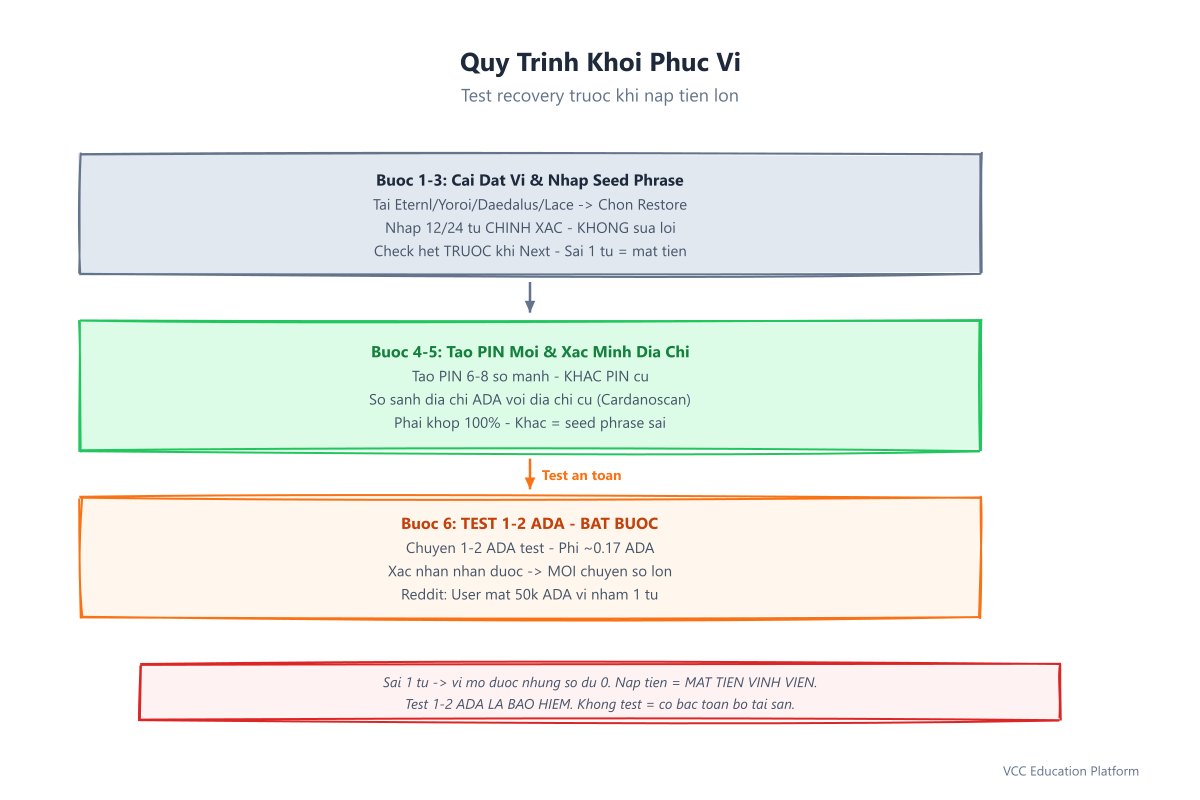
This is the MOST IMPORTANT step to confirm your backup is correct. Do it AFTER your metal backup, BEFORE loading large amounts.
- Set up a new wallet: Download the official Eternl / Yoroi / Daedalus / Lace (from the official website / Chrome Web Store / App Store / Play Store). NEVER download random .apk files.
- Select "Restore from Recovery Phrase": Open the app → Do NOT select "Create New Wallet" → Find the "Import Wallet" / "Restore Wallet" / "Recover from Seed Phrase" button.
- ENTER THE 12/24 WORDS IN ORDER: Type each word exactly, with correct spacing. Do NOT auto-correct spelling (if word 7 is "apple," type "apple," don't type "ample" for "convenience"). Check each word before clicking Next.
- Create a new PIN/password: A 6-8 digit PIN or strong password. DIFFERENT from your old device's PIN. Memorize this PIN.
- VERIFY THE ADA ADDRESS MATCHES: Compare the receiving ADA address shown on the new wallet with your old address (saved in notes, or check on Cardanoscan). It must match 100%, character for character.
- TEST WITH 1-2 ADA: Have someone send 1-2 ADA to that address. Confirm it arrives. ONLY THEN transfer larger amounts.
Common Mistakes to Avoid
- Taking a photo/screenshot of your seed phrase → saved to gallery/cloud → hacker gains access = funds gone
- Writing it in Notes, Google Drive, Email, or messaging app "Saved Messages" → clipboard malware/keylogger can read it
- Sharing with a "trusted person" or fake support → No one (not Cardano team, not Ledger, not Trezor) will ever ask for your seed phrase. Anyone who asks = SCAM.
- Only one backup, no recovery test → You won't know if your backup is correct or not until you need to recover (too late).
- Storing your seed phrase and wallet on the same device → Lose the device = lose both.
- Confusing your seed phrase with an OTP code → An OTP is a 6-digit one-time code; a seed phrase is 12-24 words used for life. NEVER share your seed phrase.
Common scam scenarios: Messaging app phishing offering "wallet recovery support," fake "Cardano Community" Facebook groups with impersonator admins, fake "Eternl Pro" or "Yoroi Premium" apps on sketchy websites — all targeting your seed phrase.
Managing a Seed Phrase Across Multiple Wallets
A common question: "I use Eternl on my phone, Yoroi on my laptop, and a Ledger for larger amounts. Do I need to back up 3 times?"
Answer: NO. One seed phrase (following the BIP-39/BIP-44/CIP-1852 standards) recovers ALL of them.
- Create a wallet on Eternl → back up the seed phrase
- Install Yoroi → select "Restore" → enter your old seed phrase → same ADA address
- Plug in a Ledger → select "Restore from recovery phrase" → enter your old seed phrase → same ADA address
Strategy for larger amounts: Use one main seed phrase for your hot wallet (Eternl/Yoroi for daily use), and a SEPARATE seed phrase for your cold wallet (Ledger/Trezor) holding larger amounts. Back up EACH seed phrase separately.
Legacy Planning — For Your Family
In many families, assets are passed on to adult children or trusted relatives. But crypto is different from real estate or gold: your heirs MUST KNOW HOW TO RECOVER IT.
Inheritance letter template (print, sign, and store sealed alongside your metal backup):
CARDANO (ADA) ASSET RECOVERY INSTRUCTIONS

Dear [Heir's Name],

If you are reading this letter, it means I am no longer here. My ADA assets are protected by a seed phrase (12/24 words) engraved on the accompanying steel plate.

HOW TO RECOVER:
1. Download the official Eternl (eternl.io) or Yoroi (yoroi-wallet.com)
2. Select "Restore from Recovery Phrase" / "Import Wallet"
3. Enter the 12/24 words from the steel plate IN ORDER, exactly as written
4. Create a new PIN, and memorize it
5. Verify the ADA address matches: [your main wallet address]
6. Test by receiving 1-2 ADA before using larger amounts

TECHNICAL SUPPORT CONTACT (if needed): [Name of a trusted person who understands crypto, phone number]

Note: NEVER share these 12/24 words with anyone else. Whoever has these words has the money.

[Your Name] - [Date] - [Signature]
Storage: Keep the letter + metal backup in a safe / sealed bag → hand it to your heir when the time comes.
FAQ
1. How is a seed phrase different from a private key?
A seed phrase (12-24 words) is the master key — back it up once, recover everything. A private key is a hex string (64 characters) that controls ONE specific address. Private keys are derived from the seed phrase through mathematical operations (BIP-32). You cannot reverse-engineer a seed phrase from a private key. Backing up your seed phrase = backing up all private keys.
2. If I lose my seed phrase, can it be recovered?
NO. There is no "forgot password" mechanism, no tech support, no backdoor. The seed phrase IS the only password. Lose your seed phrase = lose your funds forever. This is the design of blockchain: no one controls your money except you.
3. Should I store my seed phrase in a password manager?
NO. Password managers (Bitwarden, 1Password, KeePass) are designed for login passwords, PINs, and OTPs. A seed phrase needs to be stored physically offline (on metal). If your computer gets malware, your password manager can be read too.
4. Is a paper backup safe?
Only temporarily (1-2 weeks). Paper burns, gets wet, molds, ink smears, and family members may accidentally throw it away. Use paper only while waiting for your metal backup to arrive. Switch to metal AS SOON AS POSSIBLE.
5. Does testing recovery cost anything?
No blockchain fees for recovery. You only pay a network fee when sending 1-2 ADA from another wallet (~0.17 ADA). There is no fee for restoring a wallet. Testing recovery is free and mandatory.
Conclusion & Take Action Now
You've just learned: Your seed phrase is the master key, back it up on metal (316 stainless steel), NEVER store it digitally, testing recovery is MANDATORY, and prepare an inheritance letter for your loved ones.
Today's action checklist:
- Buy a metal backup online (Billfodl/Cryptosteel) OR make a DIY 316 stainless steel + stamping set
- Back up the seed phrase from your current wallet
- Test recovery on a new wallet (Eternl/Yoroi) with 1-2 ADA
- Write an inheritance letter, store it alongside your metal backup
- Share this article with friends who use a Cardano wallet