
By the VCC Editorial Team | Last updated: August 11, 2026
Imagine a thief steals your wallet. You call the bank, cancel the card, and get your money back within days. Now imagine that same thief finds the password to your crypto wallet. There is no bank to call, no support team to undo the transaction, and no refund. Your ADA is gone — permanently.
That is the reality of self-custody, and it is why cardano security is not an afterthought: it is the single most important skill any Cardano user must learn. This guide is your practical, beginner-friendly playbook. You will learn how to protect private keys, follow crypto security best practices, keep your cardano wallet security airtight, and apply cryptocurrency security tips that stop scams before they start. By the end, you will know exactly what to do — and what never to do — to keep your ADA safe.
Why Security Matters in Crypto
On Cardano, you are your own bank. Unlike a traditional bank account, your ADA is controlled entirely by cryptographic keys — not by a company, not by a government, and not by a support department. This is the core idea behind self-custody: the person who holds the keys holds the money.
That freedom comes with full responsibility. There is no bank to reverse a fraudulent transaction and no institution to recover a lost password. If someone gains access to your private keys, or if you lose them, the outcome is the same — your funds are gone with no recourse.
The stakes are real. Blockchain analytics firm Chainalysis reported that over $3.8 billion was stolen across the crypto ecosystem in 2026, and researchers estimate that the vast majority of these losses were preventable with basic security habits. The good news is that protecting yourself does not require technical genius — it requires consistent, small daily habits. Most attacks succeed because of a simple human error: sharing a phrase, clicking a bad link, or reusing a password. Each of those errors is entirely avoidable.
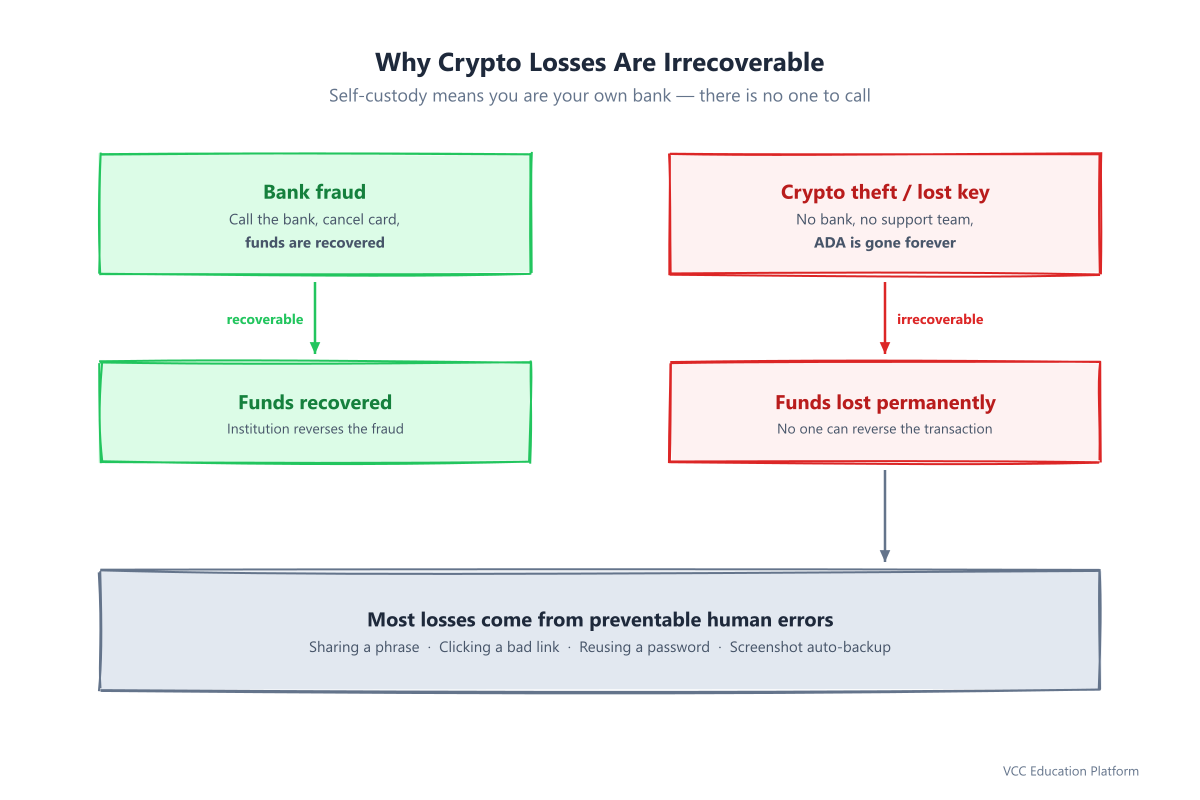
Figure 1: Why most crypto losses are preventable — bank fraud can be recovered, crypto theft cannot
The one sentence that matters most: On Cardano, "Not your keys, not your coins" is not a slogan — it is the literal law of how your funds work.
The Golden Rule: Protect Your Private Keys
Every Cardano wallet is built around a secret: your private keys and the recovery phrase (also called a seed phrase) that generates them.
Let's clarify the difference, because beginners often mix them up:
- A private key is a secret number that authorizes transactions from a specific address. Whoever holds it can spend the ADA in that address.
- A recovery phrase is a list of 12, 15, or 24 words. From those words, your wallet mathematically derives every private key in your entire wallet. In simple terms, the recovery phrase is the master key to the whole house.
This is why protecting your recovery phrase is the golden rule of how to protect private keys. If a thief has your recovery phrase, they have everything — every address, every ADA, everything. There is no second lock.
The three rules that never change
- Never share your private keys or recovery phrase — with anyone, ever. No official Cardano project, wallet, or support agent will ever ask for your recovery phrase. Anyone who does is a scammer.
- Never store keys digitally. No screenshots, no notes apps, no cloud drives, no email, no text files, no "encrypted" folders. Screenshots are the biggest silent killer: phones automatically back them up to iCloud or Google Photos, turning your secret into a file a thief can find.
- Write them on paper or stamp them into metal. Paper survives for decades if stored safely. Metal plates (titanium or steel) survive fire and flood. This is the gold standard for cold, offline storage.
Use the 3-2-1 backup rule
Security experts recommend the same backup strategy used for any irreplaceable asset:
- 3 copies of your recovery phrase
- stored on 2 different types of media (e.g., paper and metal)
- with 1 copy kept off-site (e.g., a safety deposit box or a trusted location away from home)
This way, a single fire, flood, or theft cannot destroy your access to your ADA.
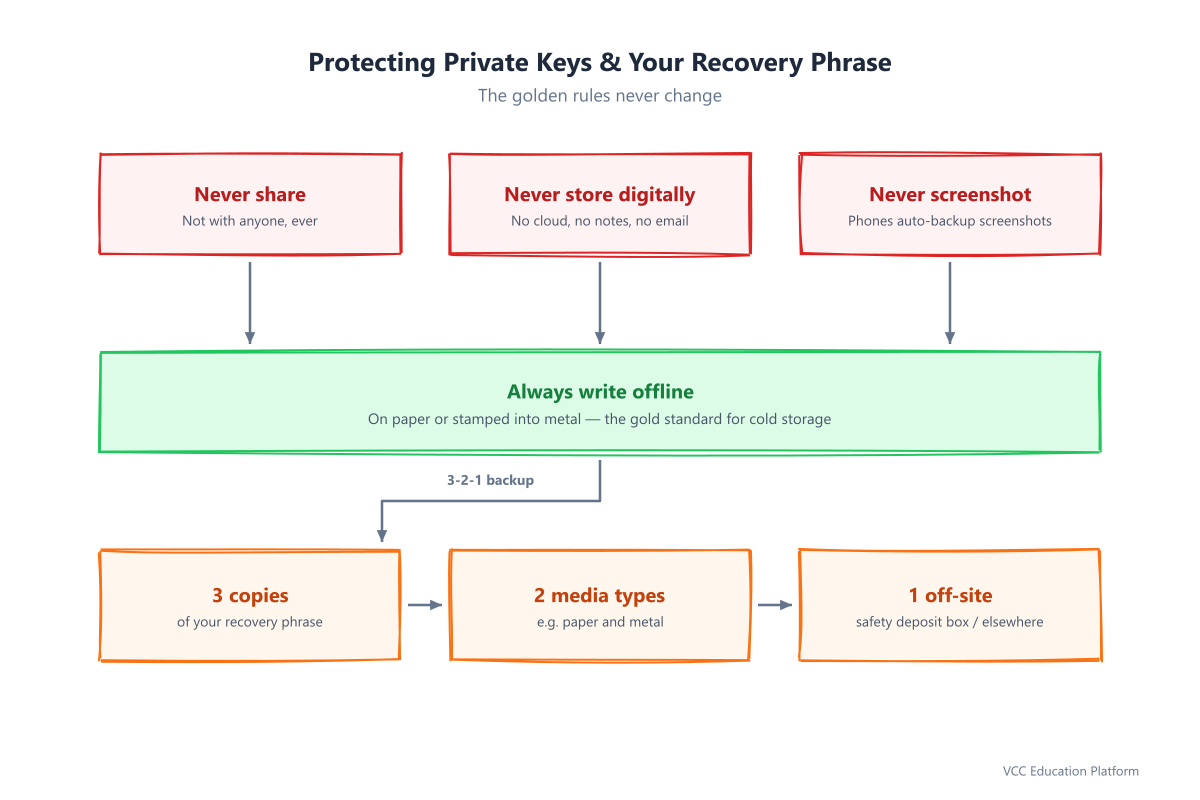
Figure 2: The three golden rules of private key protection
Crypto Security Best Practices
Protecting your keys is the foundation, but good cardano security is a complete system. Here are the general crypto security best practices that apply to every part of your crypto life.
Use strong, unique passwords
Your wallet password, exchange login, and email all need their own strong, unique passwords. Never reuse a password across accounts — a breach at one site becomes a key to the rest. A password manager is your friend for these logins (note: never store your recovery phrase in one; a password manager is for passwords, not master keys).
Turn on two-factor authentication (2FA)
Whenever an account supports it — especially exchanges and email — enable 2FA using an authenticator app such as Google Authenticator or Authy. Avoid SMS-based 2FA where possible: SIM-swap attacks can steal your phone number and the codes that go with it. An authenticator app is far more secure.
Keep everything updated
Software wallets, operating systems, browsers, and antivirus all receive security patches. Update them regularly. Run an occasional deep malware scan, especially if you access crypto on a shared or older device.
Use official sources only
This is where many Cardano users get caught. Always download wallet software from the official project websites — never from search ads, app-store clones, or links sent in messages. We'll expand on this in the scam section, because fake wallets are the #1 way beginners lose funds. For the authoritative source of Cardano security guidance, see the official Cardano Foundation documentation.
Cardano Wallet Security
Let's apply these principles specifically to your Cardano wallet.
Software vs. hardware wallets
There are two main ways to hold ADA:
- Software wallets (e.g., Daedalus, the full-node wallet, or Yoroi, a light wallet) run on your phone or computer. They are convenient and free, but your keys live on an internet-connected device.
- Hardware wallets (e.g., Ledger or Trezor) keep your private keys on a separate offline device. Even if your computer is infected with malware, your keys never leave the hardware wallet.
A practical strategy: keep the majority of your ADA (say, 80–90%) in a hardware wallet for long-term storage, and keep only a small "spending" amount in a software wallet for daily transactions. You get the security of cold storage with the convenience of a hot wallet for everyday use.
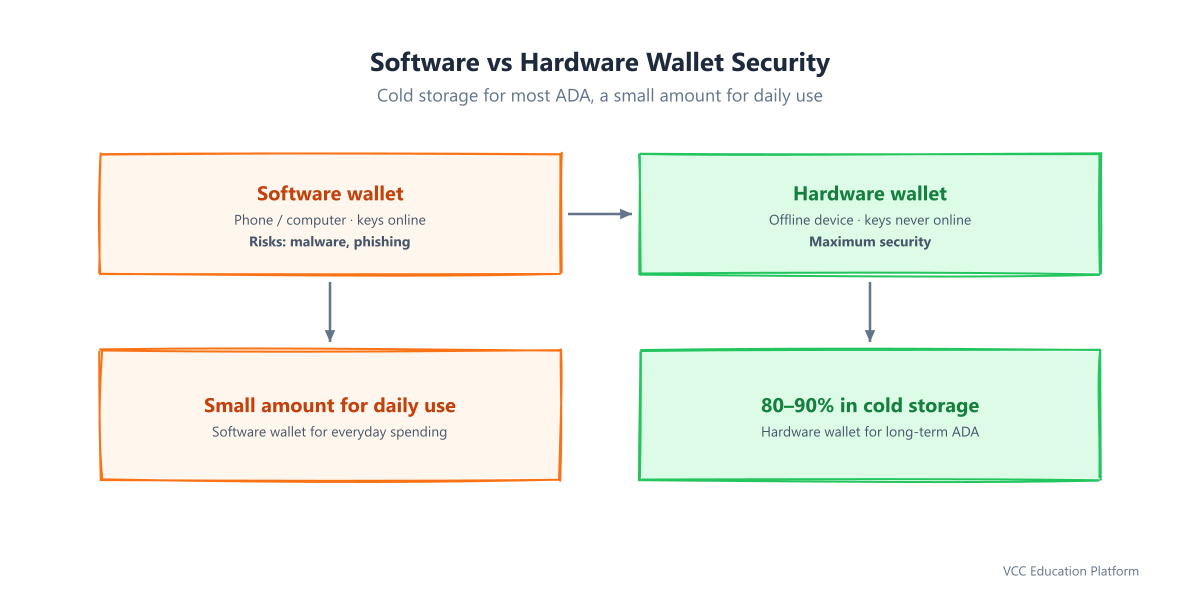
Figure 3: Software vs hardware wallets — and why the 80-90% cold storage rule matters
A crucial Cardano warning: Daedalus has no official mobile version. If you see a "Daedalus mobile" app anywhere, it is a scam. Daedalus is desktop-only and must be downloaded from the official site.
Back up your recovery phrase correctly
When you create a new Cardano wallet, write down your recovery phrase immediately, in order, and test that you can restore it once a year. A phrase you never test is a phrase you might lose. Store the written copies per the 3-2-1 rule described above.
Verify every transaction
Before you confirm any transaction, double-check the destination address. Scammers use techniques like clipboard hijacking (malware swaps the address you pasted with the attacker's address) and address poisoning (fake transactions make a scam address appear in your history). Compare addresses character by character, not just the first and last few digits.
Staking security
Staking on Cardano lets you earn rewards while keeping full control of your ADA — but only if you do it through a delegation to a pool, not by sending funds or keys anywhere. Legitimate staking never requires you to send your ADA or your recovery phrase to anyone. You delegate from your own wallet, and your ADA never leaves your control. If anyone asks you to "transfer your ADA to stake it," that is a scam.
Avoiding Scams and Phishing
Scams are the most common way beginners lose ADA. The good news: almost every scam follows a recognizable pattern, and once you know the red flags, they become easy to spot.
Fake wallets and fake websites
Attackers build fake wallet apps and near-identical websites that look like the real thing. They spread them through search ads, fake app stores, and phishing links. Always type the official wallet URL yourself, or use a saved bookmark — never click a link sent to you by email or message. Check for a padlock and https:// in the address bar, but understand that even that can be faked, so verifying the exact domain is essential.
Airdrop and giveaway scams
"You've won a Cardano airdrop!" "Double your ADA instantly!" These are always scams. No legitimate Cardano project gives away ADA or "matches" your deposit. Airdropped tokens or NFTs that appear in your wallet and point you to a website are traps — the site will ask you to connect your wallet or enter your phrase, and you will lose everything. No giveaways. Ever.
Fake "support"
This is the sneakiest one. After you ask a question online, a scammer posing as official support messages you first on Telegram, X (Twitter), or Discord. They sound helpful and professional. They will eventually ask you to "verify your wallet," share your recovery phrase, or send a small test amount to a "safe" address. Real Cardano support never messages you first and never asks for your phrase. Treat any unsolicited support message as hostile.
Phishing red flags to memorize
- Urgency: "Act now or your funds will be locked!"
- Requests for your recovery phrase, private key, or password
- Fake support that contacts you first
- Links sent in emails, DMs, or comments
- Generic greetings ("Dear user") and poor spelling
- "Get rich quick" guarantees or free-money promises
- Impersonation accounts with one letter different from the real one
If something feels rushed or too good to be true, pause. Scammers build urgency specifically to stop you from thinking.
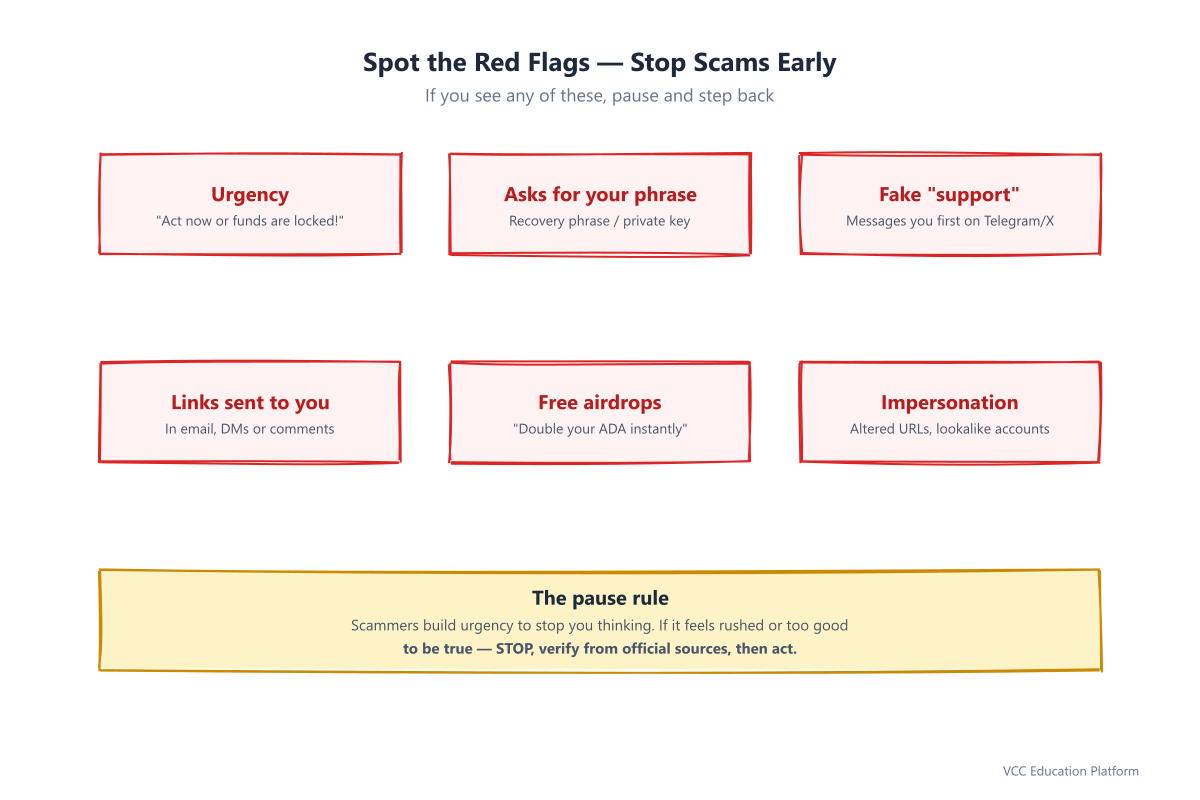
Figure 4: Spot these red flags to block phishing and scam attempts
A Practical Security Checklist
Here is your quick-reference cardano security checklist. Save it, and run through it whenever you set up a new wallet or feel unsure.
Set up your defense (do once)
- [ ] Create a strong, unique password for every crypto account
- [ ] Enable 2FA with an authenticator app on exchanges and email
- [ ] Download Cardano wallets only from official sites (no "Daedalus mobile")
- [ ] Write down your recovery phrase on paper or metal, in order
- [ ] Make 3 copies on 2 media types, with 1 stored off-site
- [ ] Move the majority of ADA to a hardware wallet for cold storage
Build your daily habits (do every time)
- [ ] Verify the full destination address before confirming any transaction
- [ ] Never click links sent via email, DMs, or comments — type URLs yourself
- [ ] Never share your recovery phrase with anyone, ever
- [ ] Never connect your wallet to a site you don't fully trust
- [ ] Update your wallet, OS, and antivirus regularly
Review periodically (do regularly)
- [ ] Test restoring your wallet from your recovery phrase once a year
- [ ] Check for airdropped tokens/NFTs and ignore (don't click) suspicious ones
- [ ] Re-evaluate your security setup whenever your holdings grow
- [ ] If you suspect a compromise, move funds to a fresh wallet immediately
The goal is not perfection — it is consistency. Every checkmark is a layer of protection, and layers are what make your cardano wallet security robust.
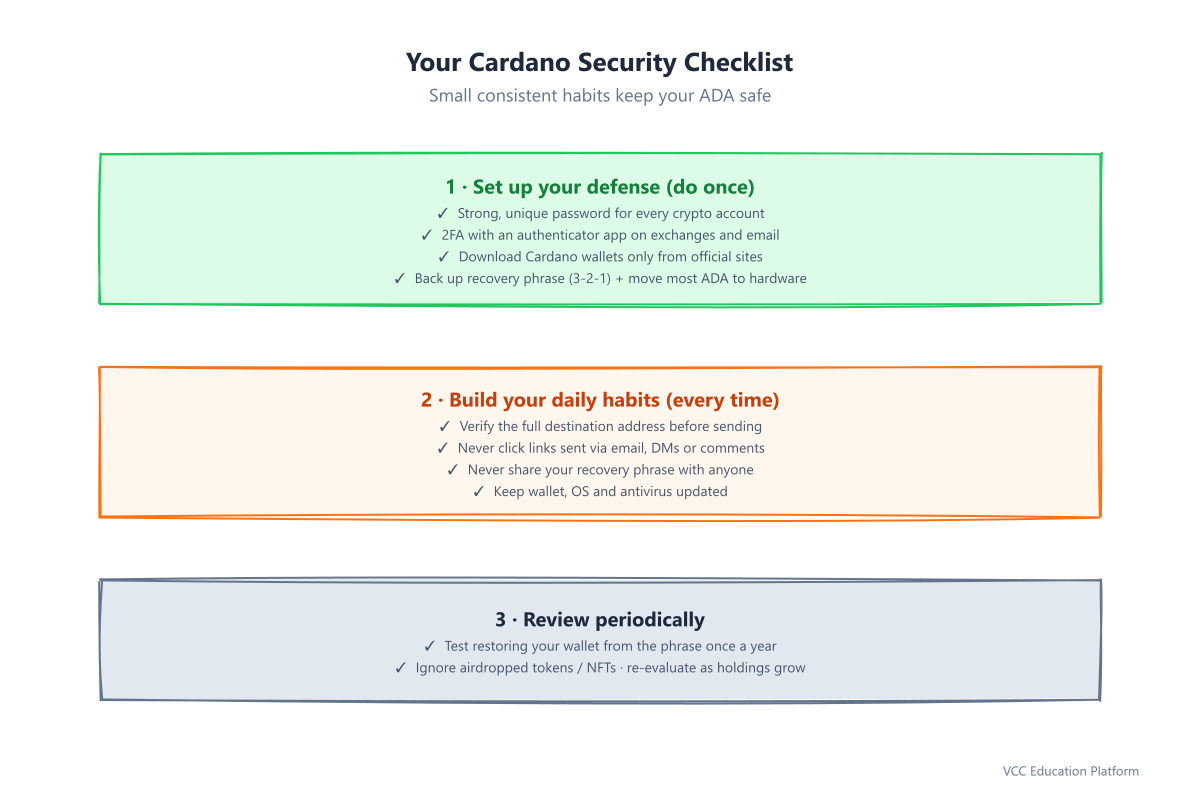
Figure 5: Build your daily habits and periodic review routine around this checklist
Conclusion
Cardano puts you in full control of your money, and with that control comes responsibility. The good news is that strong security is simple and habit-based: protect your private keys, follow crypto security best practices, keep your cardano wallet security updated, and apply the cryptocurrency security tips you've learned here. Remember the golden rules — never share your recovery phrase, never store keys digitally, and always verify before you send.
You don't need to be an expert to be safe. You just need to build a few consistent habits and stay calm when something feels urgent. Take the time now to back up your phrase, enable 2FA, and bookmark the official wallet site. Your future self — and your ADA — will thank you.
Want to keep learning? Explore official Cardano resources and always double-check any security advice against the official Cardano Foundation documentation. Stay safe, stay curious, and stay in control.
Trusted resources
For ongoing, authoritative guidance, rely only on official sources:
- Official Cardano Documentation
- Cardano Foundation Security Guidelines
- Chainalysis Crypto Crime Reports
FAQ
What is the most important cardano security rule?
Never share your recovery phrase or private keys with anyone, and never store them digitally. Whoever holds the keys holds the ADA.
How do I protect private keys in a crypto wallet?
Write your recovery phrase on paper or metal using the 3-2-1 backup rule (3 copies, 2 media types, 1 off-site), keep the majority of your ADA in a hardware wallet, and never screenshot or upload your keys.
Is Daedalus available on mobile?
No. Daedalus is desktop-only. Any "Daedalus mobile" app is a scam.
Why is 2FA better than SMS authentication for crypto?
SMS codes can be stolen through SIM-swap attacks. An authenticator app keeps codes on your device and is far harder to compromise.
Can my ADA be recovered if I lose my recovery phrase?
No. Cardano is self-custody with no central authority. If you lose your recovery phrase, your ADA cannot be recovered — which is why backups and annual restore tests are essential.
How do I stake ADA securely?
Delegate to a pool from within your own wallet. Your ADA and keys never leave your control. Never send ADA or your recovery phrase to anyone claiming to offer "staking" or "rewards."