
When you create a Cardano wallet, the system generates a cryptographic key pair: a private key and a public key. The private key is the "digital signature" that allows you to spend ADA from a specific address. Whoever holds the private key controls the ADA at that address. There is no "forgot password" option, and no recovery is possible if it is lost — unless you have your seed phrase.
What Is a Private Key?
Imagine this: a public key is like your bank account number — you share it with others so they can send you money. A private key is like your signature + PIN + OTP combined into one — it is used to sign transactions and prove you are the owner. Whoever has the private key has full control over the ADA at that address.
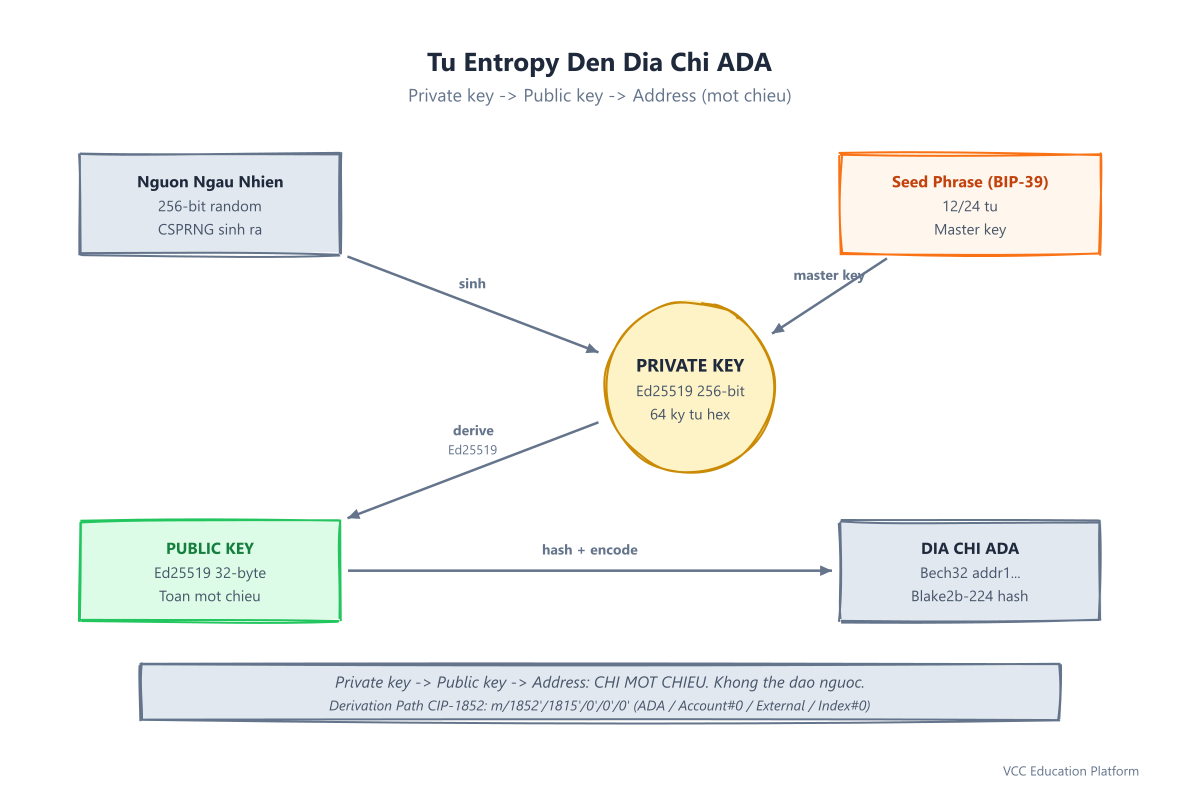
Technically: a private key is a 256-bit (32-byte) random number generated by a cryptographically secure pseudo-random number generator (CSPRNG). Cardano uses the Ed25519 elliptic curve — a modern standard that is fast, secure, and resistant to side-channel attacks.
The private key is encoded as 64 hex characters (for example, a1b2c3d4e5f6...) or in Bech32 format as ed25519_sk1.... From the private key, one-way mathematics (elliptic curve multiplication) generates the public key (32 bytes / 64 hex). From the public key, a Blake2b-224 hash plus the addr1/addr_test1 prefix produces the ADA address.
Important: The relationship is one-way. From private key → public key → address: EASY. From address → public key → private key: IMPOSSIBLE (cryptographically guaranteed).
Private Key vs Seed Phrase vs Public Key — Comparison Table
This is the most common source of confusion for beginners. Remember this:
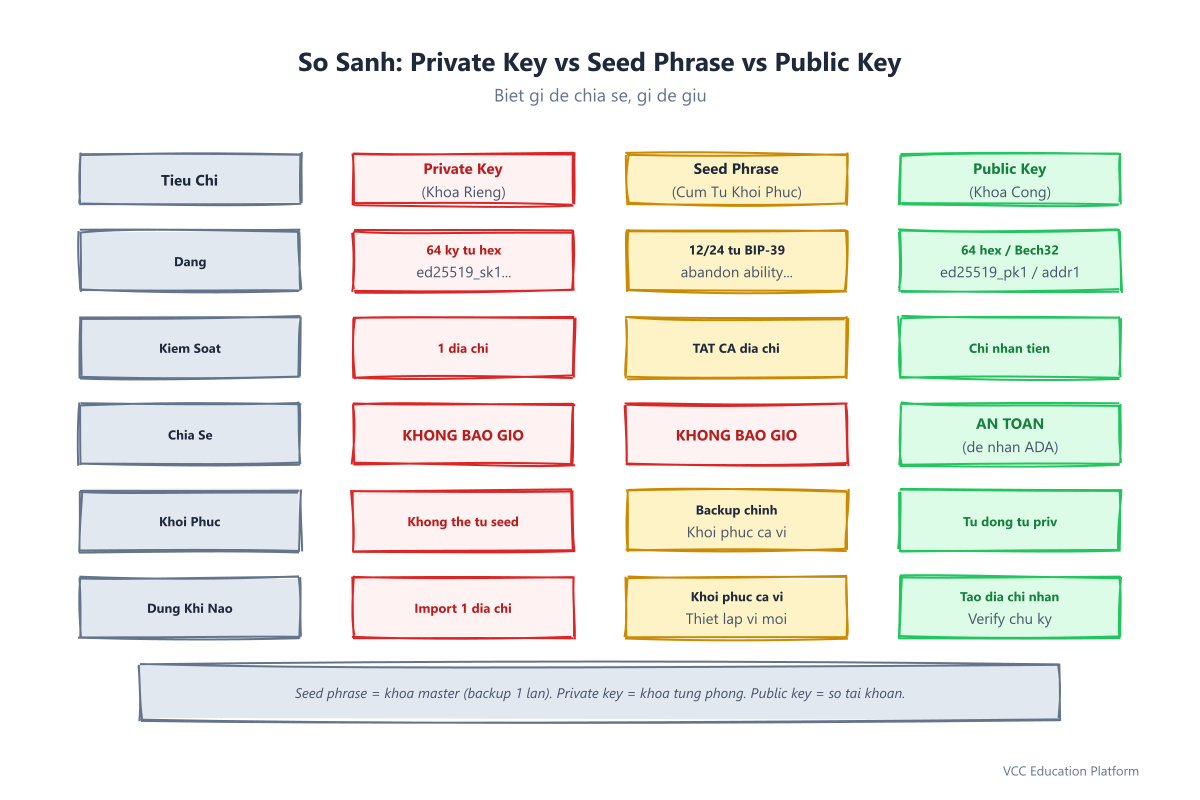
| Feature | Private Key | Seed Phrase (Recovery Phrase) | Public Key |
|---|---|---|---|
| Format | 64 hex characters / ed25519_sk1... |
12 or 24 English words (BIP-39) | 64 hex characters / ed25519_pk1... / addr1... |
| Controls | A single address | ALL addresses in the wallet | Only used to receive funds |
| Sharing | 🚫 NEVER | 🚫 NEVER | ✅ SAFE (for ADA senders) |
| Recovery | Cannot be recovered from a seed | Master backup — restores the entire wallet | Automatically generated from the private key |
| When to use | Importing one specific address | Restoring the entire wallet, setting up a new wallet | Creating a receive address, verifying signatures |
| Example | ed25519_sk1abc123... |
abandon ability able... |
ed25519_pk1xyz789... / addr1q9... |
Golden rule:
- Seed phrase = the "master key" — back it up ONCE, it restores EVERYTHING.
- Private key = the "key to each individual room" — rarely needed directly.
- Public key / Address = the "account number" — share freely to receive ADA.
Private Keys in Cardano: Ed25519 & BIP-1852
Cardano does not use secp256k1 (like Bitcoin/Ethereum); instead it uses Ed25519 (Edwards-curve Digital Signature Algorithm):
- 256-bit security — equivalent to AES-128, safe against near-future quantum computers
- Deterministic signatures — no entropy needed when signing, avoiding nonce reuse bugs
- Batch verification — faster for node validation
- No subkeys — simpler, fewer implementation bugs
Standard Cardano derivation path (CIP-1852):
m / 1852' / 1815' / 0' / 0 / 0
  │      │      │   │  └── address_index (0, 1, 2...)
  │      │      │   └── role: 0 = external (receive), 1 = internal (change)
  │      │      └── account_index (0, 1, 2...)
  │      └── coin_type: 1815 = ADA (SLIP-44)
  └── purpose: 1852 = Cardano HD wallet (BIP-44 extension)
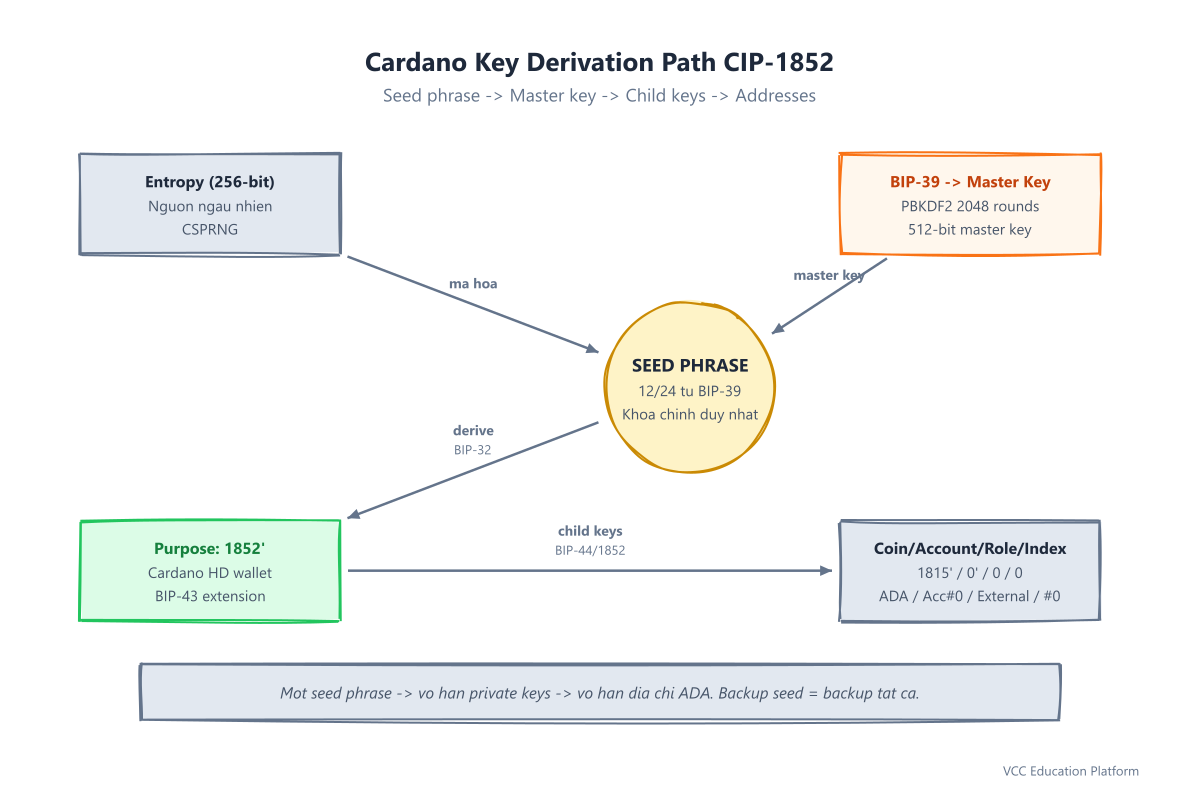
The flow: Seed phrase (BIP-39) → Master private key (BIP-32) → Child private keys along the path above → Each child = one key pair = one ADA address.
This means: One seed phrase = infinite private keys = infinite ADA addresses. You do not need to back up each private key individually — backing up the seed phrase is enough.
Exporting/Importing Private Keys Between Wallets (Eternl, Yoroi, Daedalus, Lace)
When do you need to export a private key?
- Moving one specific address to another wallet (without restoring the entire wallet)
- dApp development: you need a private key to sign transactions programmatically
- Recovering from an old paper wallet / brain wallet
Instructions for each wallet:
Eternl (Extension/Mobile):
- Settings (gear icon) → Advanced → Export Private Key
- Enter PIN / authenticate with fingerprint
- Select the account → Copy the Payment Signing Key (64 hex)
- DO NOT save to a file, DO NOT take a screenshot
Yoroi (Extension/Mobile):
- Settings → Export → Select Payment Key
- Confirm your password
- Copy the private key (payment key only, no stake key)
Daedalus (Desktop Full Node):
Does not support direct private key export (by design, for security). To move funds: use the seed phrase to restore into another wallet.
Lace (Extension):
- Settings → Advanced → Export Private Key
- Authenticate with PIN
- Copy the private key
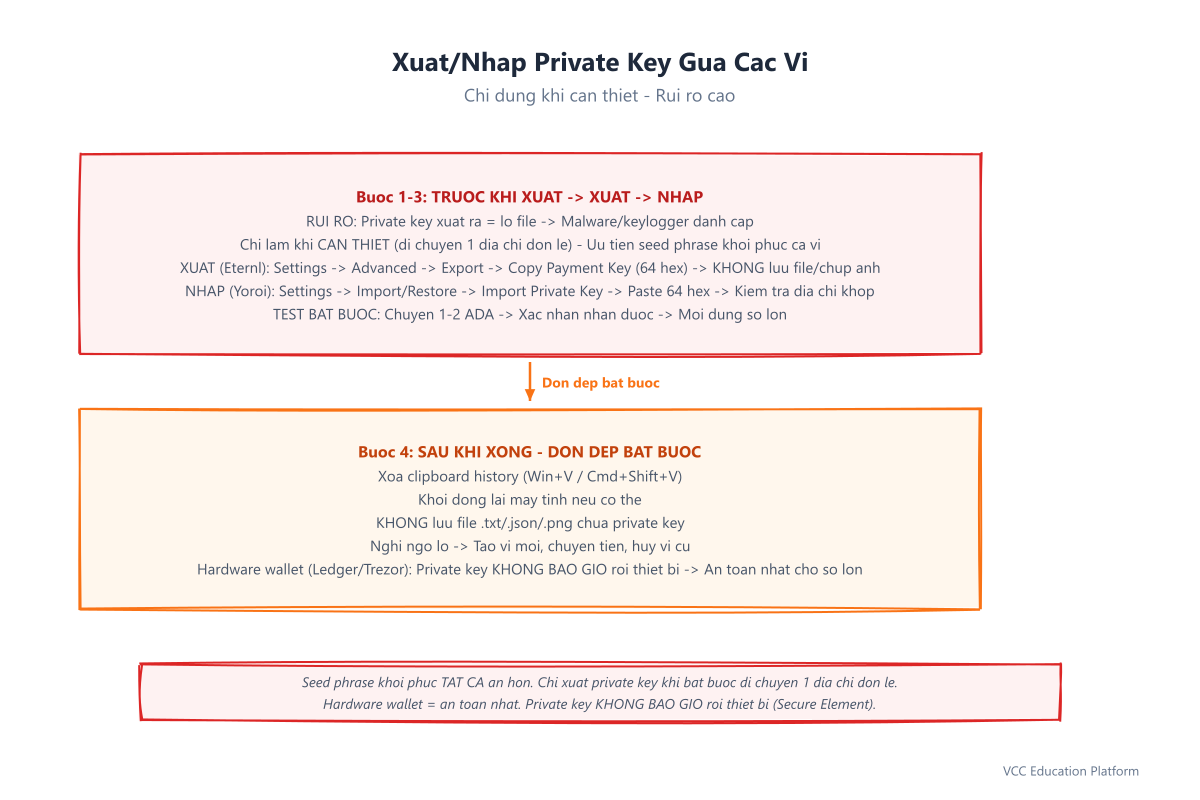
Process for importing a private key into the destination wallet:
- Open the destination wallet (Eternl/Yoroi/Lace) → Settings → Import / Restore
- Select "Import Private Key" (not Restore from Seed Phrase)
- Paste the 64 hex characters → Confirm
- VERIFY: Does the displayed ADA address match the source address?
- TEST: Have someone send 1-2 ADA → Confirm receipt → Then use larger amounts
Safe Private Key Management — Best Practices
1. NEVER share, save, or screenshot it
- Do not send it via messaging apps, email, or social media
- Do not store it on cloud drives, in notes apps, or in password managers
- Do not take screenshots, print it out, or write it in a notebook
- Anyone asking for your private key = 100% A SCAM (even "Cardano support" or "group admin")
2. Use a hardware wallet for large amounts — the private key never leaves the device
- Ledger Nano S Plus / X (~$79-$149 from the official store)
- Trezor Model One / Safe 3 (~$49-$79)
- The private key is generated inside a Secure Element (security chip) and signs transactions offline
- The seed phrase backup = a backup for ALL private keys on the device
- Think of it like: keeping your money in a bank vault and only carrying a small cash wallet outside
3. Software wallets (Eternl, Yoroi, Lace) — only for small amounts, understand the risks
- The private key is stored in a keystore file on your computer/phone (encrypted with a PIN/password)
- If your computer is infected with malware/rootkit → the private key can be read
- Limit: Only keep "daily spending" funds (for example, under 500 ADA)
- Move large amounts to a hardware wallet
4. Backup: Back up the SEED PHRASE, do NOT back up individual private keys
- The seed phrase restores ALL private keys (via the derivation path)
- Backing up each private key individually = cumbersome, error-prone, and easy to leak
- See: Seed Phrase Backup Guide
5. Key Rotation (periodic key changes)
- If you suspect your computer has a virus/keylogger → create a new wallet and transfer funds to it
- The old seed phrase → discard it, never use it again
- Like: changing your bank password periodically, or whenever you suspect it has been leaked
6. Multi-signature (Multisig) — for organizations/businesses
- Requires 2/3 or 3/5 private keys to sign a transaction
- No single person can spend funds alone
- Cardano supports this via Plutus scripts / CIP-1854
Common Mistakes to Avoid
- Confusing a private key with a seed phrase → Wrong backup, lost funds on restore (a private key only restores one address)
- Exporting a private key to a .txt/.json file on your computer → Malware can read it instantly
- Importing a private key into an unknown website / phishing site → Funds stolen instantly
- Sharing a private key with "support" / "group admin" → 100% a scam
- Not testing the import before transferring large amounts → Wrong private key = funds sent to a different address = lost forever
- Using the same private key for multiple purposes (staking, DeFi, daily spending) → Increases the attack surface
- Not using a hardware wallet for large amounts → A little "convenience" costs you your entire balance
Real-world scam scenarios: Messaging-app scammers offering to "help export your private key," social media group admins posing as guides telling you to "import your private key to claim an airdrop," fake Eternl/Yoroi apps asking you to enter your private key — THEY ARE ALL AFTER YOUR PRIVATE KEY.
Hardware Wallets: The Private Key Never Leaves the Device
This is the safest solution for large amounts:
| Device | Price (USD) | Secure Element | Screen | Bluetooth | Best for |
|---|---|---|---|---|---|
| Ledger Nano S Plus | ~$79 | ST33K2M5 (CC EAL5+) | Yes | No | Beginners, budget |
| Ledger Nano X | ~$149 | ST33K2M5 | Yes | Yes | Heavy mobile users |
| Trezor Model One | ~$49 | No (CPU only) | Yes | No | Budget, open-source |
| Trezor Safe 3 | ~$79 | Secure Element | Yes | No | Balanced security/price |
| Trezor Model T | ~$129 | No | Touchscreen | No | Power user |
Safe setup process:
- Buy from official resellers / official Ledger/Trezor website — DO NOT buy used, DO NOT buy from strangers
- Initialize: The device generates a seed phrase → Metal backup (stainless steel 316) immediately
- The seed phrase = backup for ALL private keys (payment + stake) on the device
- Sign transactions: Press the physical button on the device → The private key signs offline → Transaction is secure
FAQ
1. How is a private key different from a seed phrase?
A private key (64 hex) = the key to one address. A seed phrase (12/24 words) = the master key to ALL addresses. The seed phrase → master key → generates infinite private keys along the derivation path. Backing up the seed phrase = backing up all private keys. It is impossible to reverse-engineer a seed phrase from a private key.
2. Can I change my private key?
You cannot change the private key of an existing address (the mathematics is immutable). To "change keys": create a new wallet (new seed phrase) → transfer funds to the new address → abandon the old wallet.
3. If I lose my private key, can I recover it from the seed phrase?
YES. The seed phrase recovers ALL private keys along the standard derivation path. Simply restore the wallet from the seed phrase → all addresses (with their private keys) reappear. Condition: the seed phrase must be exact and use the correct derivation path (CIP-1852 for Cardano).
4. Why shouldn't I export my private key to a file?
A .txt/.json/.png file on your computer/phone = the #1 target for malware. Keyloggers, clipboard hijackers, stealers, and ransomware all scan files for private keys. A hardware wallet solves this: the private key never touches the internet/computer.
5. Is a private key the same as a wallet login password?
COMPLETELY DIFFERENT.
- Wallet password/PIN: Opens the app and decrypts the local keystore file (only on that device)
- Private key: Signs transactions on the blockchain (whoever holds it can spend from anywhere)
Conclusion & Take Action Now
You have just learned: a private key = the digital signature for one address (Ed25519, 64 hex). A seed phrase = the master key for everything. A hardware wallet = the private key never leaves the device. NEVER share, save, or export it to a file.
Today's action checklist:
- Understand clearly: Private key ≠ Seed phrase ≠ Public key ≠ Wallet password
- For large amounts (>500 ADA) → Buy a hardware wallet (official Ledger/Trezor)
- Back up your seed phrase on metal (stainless steel 316) — See Seed Phrase Backup Guide
- Use a software wallet only for daily spending funds
- Test importing a private key (if needed) with 1-2 ADA before using larger amounts