
Congratulations on setting up your first Cardano wallet! Now you're ready to receive your first ADA tokens. Whether someone is sending you ADA as a gift, you're buying it from an exchange, or you're receiving staking rewards, knowing how to safely receive ADA is an essential skill for every Cardano user.
In this guide, we'll walk you through everything you need to know about receiving ADA, from understanding Cardano addresses to verifying transactions on the blockchain. Let's get started!
Understanding Cardano Addresses
Before you receive ADA, it's important to understand what a Cardano address actually is. Think of your Cardano address like your bank account number—it's a unique identifier that tells the network where to send your ADA.
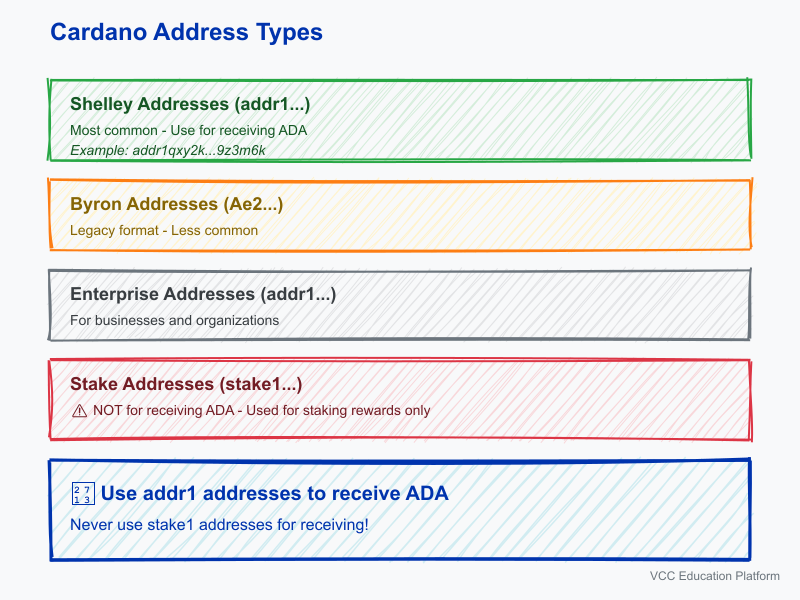
Cardano addresses typically start with "addr1" for modern Shelley-era addresses, which are the most common type you'll encounter. These addresses are usually 58-98 characters long and look something like this:
addr1qxy2k...9z3m6kImportant notes about Cardano addresses:
- Addresses are case-sensitive—copy them exactly as shown
- Each wallet can generate multiple addresses
- You can use a new address for each transaction for better privacy
- Never confuse your receiving address with your stake address (which starts with "stake1")
Preparing to Receive ADA
Before someone sends you ADA, make sure you have:
- A fully synced and unlocked wallet
- Your receiving address copied or displayed as a QR code
- The blockchain explorer ready for transaction verification
Receiving ADA in Daedalus Wallet
Daedalus is Cardano's official full-node wallet, offering the highest security. Here's how to receive ADA in Daedalus:
Step 1: Launch Daedalus and unlock your wallet using your spending password
Step 2: Click on the "Receive" tab in the left sidebar
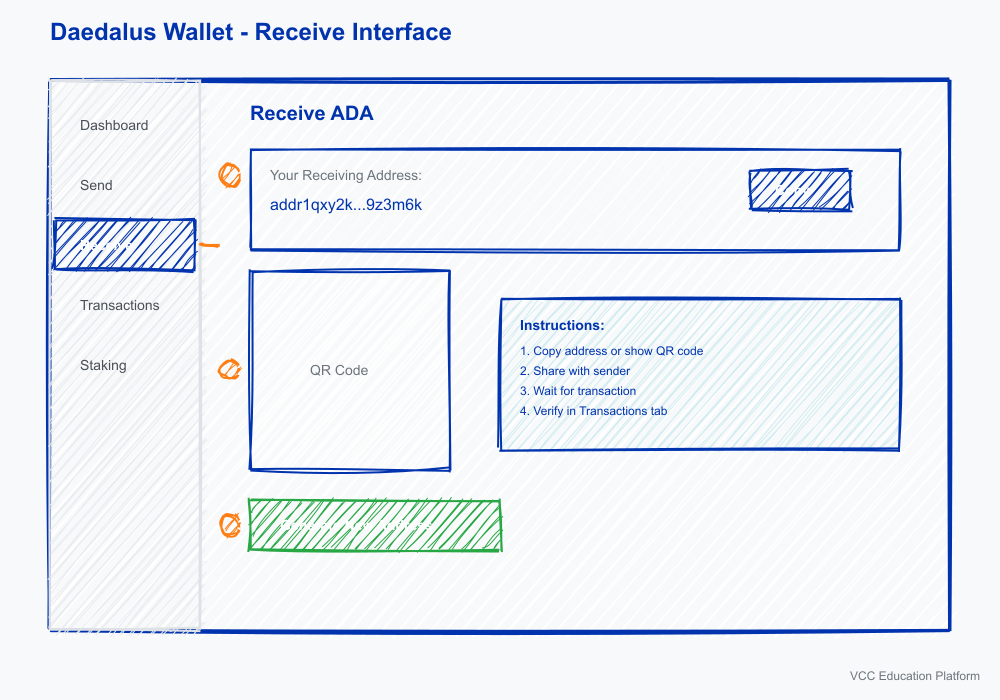
Step 3: You'll see a list of your receiving addresses. You can:
- Use an existing address by clicking "Copy"
- Generate a new address by clicking "Generate new address"
Step 4: Share the copied address with the sender, or show them the QR code if they're using a mobile wallet
Step 5: Wait for the transaction to appear in your "Transactions" tab
Step 6: Verify the transaction on a blockchain explorer (we'll cover this later)
Receiving ADA in Yoroi Wallet
Yoroi is a light wallet that's faster and easier to use, perfect for beginners:
Step 1: Open the Yoroi browser extension or mobile app
Step 2: Click the "Receive" button on the main screen
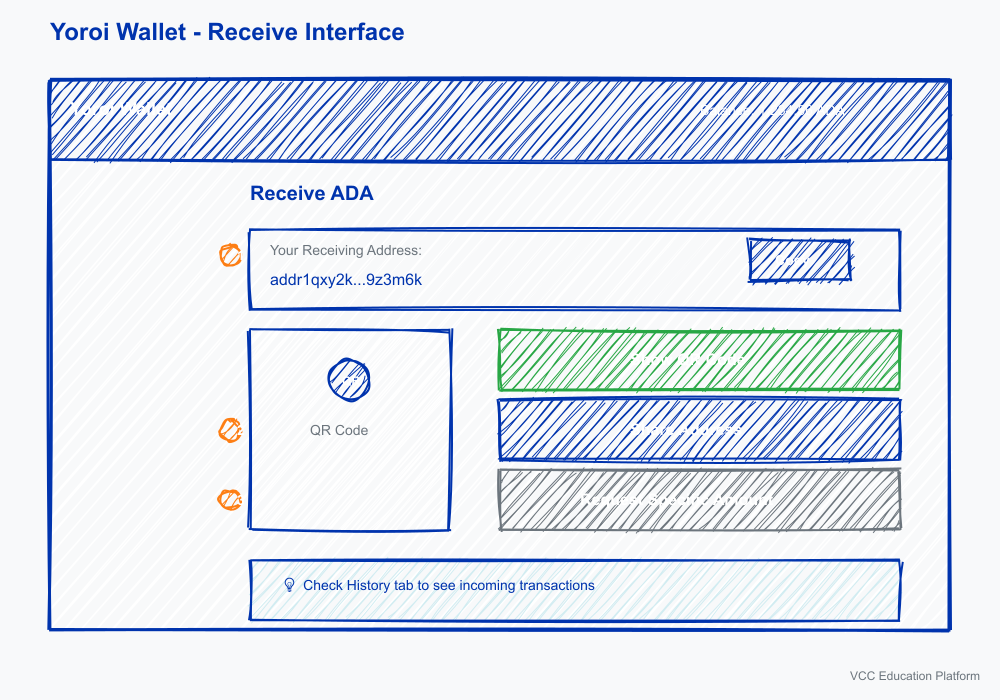
Step 3: Your receiving address will be displayed automatically
- Click "Copy" to copy the address to your clipboard
- Click the QR code icon to display a scannable QR code
Step 4: Share the address with the sender
Step 5: Check the "History" tab to see incoming transactions
Step 6: Once confirmed, the ADA will appear in your balance
Receiving ADA in Eternl Wallet
Eternl (formerly CCVault) is another popular light wallet with a user-friendly interface:
Step 1: Open your Eternl wallet
Step 2: Click the "Receive" icon (usually looks like a download arrow)
Step 3: Your address will be displayed with a QR code
Step 4: Copy the address or show the QR code to the sender
Step 5: Monitor your activity feed for the incoming transaction
Step 6: Confirm receipt by checking your balance
Receiving ADA on a Hardware Wallet
For maximum security, especially with larger amounts, you might use a hardware wallet like Ledger or Trezor:
Step 1: Connect your hardware wallet to your computer
Step 2: Open Daedalus or Yoroi (both support hardware wallets)
Step 3: Follow the same receive process as above
Step 4: When prompted, confirm the transaction on your hardware wallet device
Step 5: The ADA will be received directly to your hardware wallet's address
Verifying Your Transaction
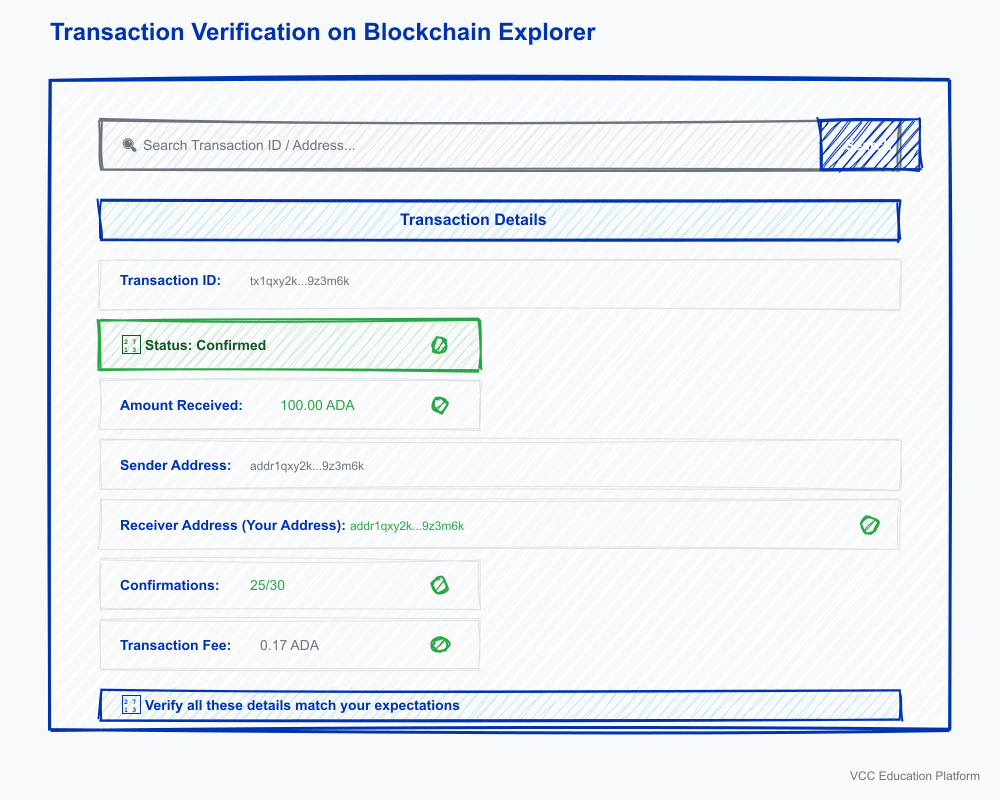
After someone sends you ADA, it's crucial to verify the transaction on the blockchain. This ensures the transaction is legitimate and confirmed.
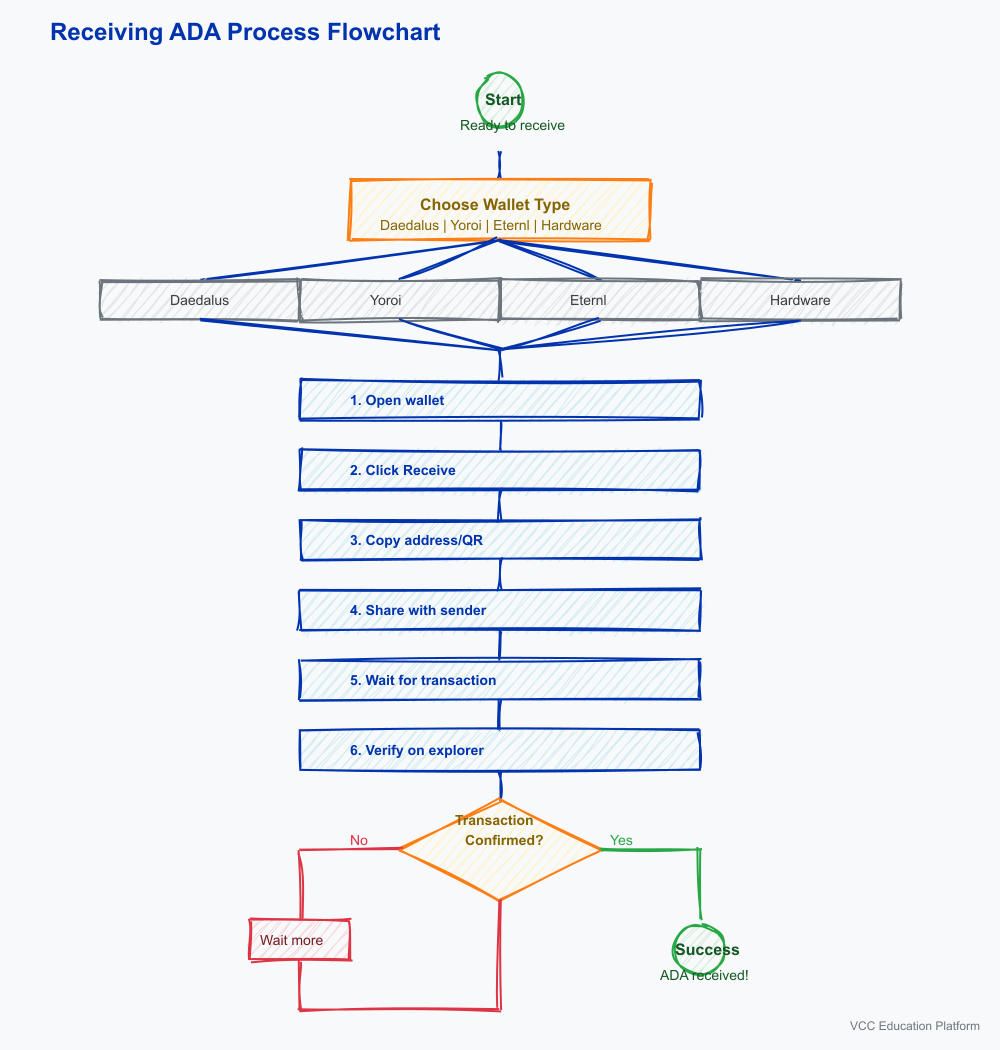
How to Verify on a Blockchain Explorer
Step 1: Get the transaction ID (tx hash) from your wallet
- In Daedalus: Click on the transaction in the "Transactions" tab
- In Yoroi: Click on the transaction in "History"
- In Eternl: Click on the transaction in your activity feed
Step 2: Visit a Cardano blockchain explorer
- cardanoscan.io (most popular)
- explorer.cardano.org (official)
- adapools.org
Step 3: Paste the transaction ID into the search bar
Step 4: Verify the following details:
- Status: Should show "Confirmed" (not "Pending")
- Amount: Matches what you expected to receive
- Receiver Address: Matches your wallet address
- Sender Address: Shows who sent the ADA
- Confirmations: More confirmations = more secure
- Fee: Shows the transaction fee paid
Understanding Confirmation Times
Cardano's network produces a new block approximately every 20 seconds. Here's what to expect:
- First confirmation: Usually within 20-60 seconds
- Full security: 20-30 confirmations (about 7-10 minutes)
- Exchange deposits: May require more confirmations before crediting
Security Best Practices When Receiving ADA
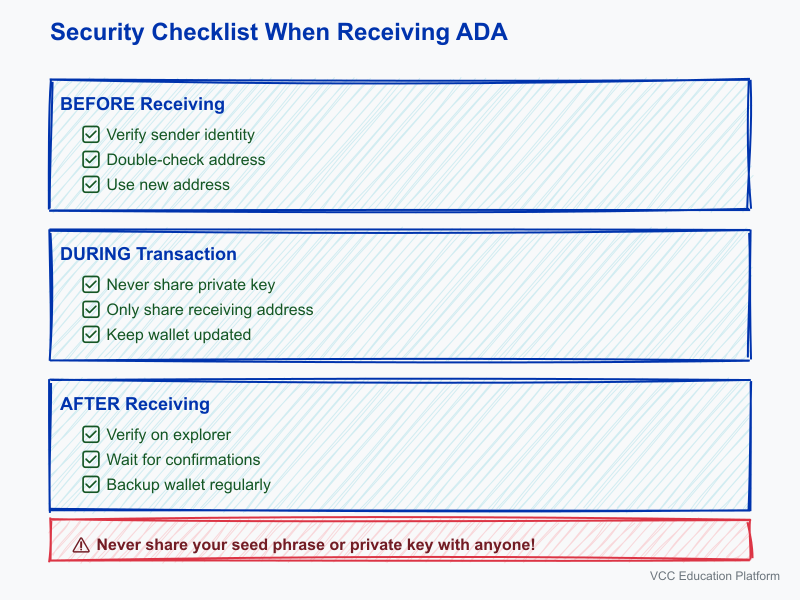
Protecting your ADA is paramount. Follow these security guidelines:
Before Receiving
- ✅ Always verify the sender's identity if possible
- ✅ Double-check that you're providing the correct address
- ✅ Use a new address for each transaction (privacy)
- ✅ For large amounts, consider a small test transaction first
During the Transaction
- ✅ Never share your private key or seed phrase
- ✅ Only share your receiving address
- ✅ Keep your wallet software updated
- ✅ Use a secure internet connection
After Receiving
- ✅ Verify the transaction on a blockchain explorer
- ✅ Wait for full confirmations before spending
- ✅ Back up your wallet regularly
- ✅ Consider moving large amounts to cold storage
Common Mistakes to Avoid
Even experienced users can make mistakes. Here are the most common ones:
1. Using the Wrong Address Type
- Mistake: Using a stake address (starts with "stake1") instead of a receiving address
- Fix: Always use addresses starting with "addr1" for receiving ADA
2. Copying Incomplete Addresses
- Mistake: Not copying the full address (truncated)
- Fix: Always verify the full address is copied (58-98 characters)
3. Sending to the Wrong Network
- Mistake: Providing a Cardano address for Bitcoin or Ethereum
- Fix: Clearly communicate that you need ADA sent to Cardano
4. Not Waiting for Confirmation
- Mistake: Assuming ADA is received immediately
- Fix: Always wait for blockchain confirmation before considering it final
5. Ignoring Small Test Transactions
- Mistake: Not doing a test transaction for large amounts
- Fix: Always send a small test amount first for large transfers
6. Falling for Scams
- Mistake: Sharing private information with unknown senders
- Fix: Never share private keys, seed phrases, or passwords
Troubleshooting Common Issues
Transaction Not Appearing
If you don't see your transaction:
- Check if the sender actually sent it (ask for transaction ID)
- Verify the sender used the correct address
- Check a blockchain explorer with the transaction ID
- Ensure your wallet is fully synced
- Wait a bit longer—network congestion can cause delays
Transaction Stuck as Pending
If your transaction shows as pending:
- Check the blockchain explorer for status
- Ensure the sender included sufficient fees
- Contact the sender if it's been more than 30 minutes
- Check Cardano network status for any issues
Wrong Amount Received
If you received a different amount than expected:
- Verify on blockchain explorer
- Check if transaction fees were deducted
- Confirm with the sender about the intended amount
- Some exchanges send slightly less due to fees
What's Next?
Now that you know how to receive ADA, you might want to learn:
- How to send ADA to others
- How to stake your ADA for rewards
- How to use Cardano blockchain explorer effectively
- How to keep your wallet secure
Receiving ADA is just the beginning of your Cardano journey. With these skills, you're ready to participate in the Cardano ecosystem confidently!
Quick Reference Card
| Wallet | Receive Button | Where to Find It |
|---|---|---|
| Daedalus | "Receive" tab | Left sidebar |
| Yoroi | "Receive" button | Main screen |
| Eternl | Receive icon | Main screen |
| Hardware Wallet | Same as software wallet | Via Daedalus or Yoroi |
Need Help?
- Join Cardano community forums for support
- Check official wallet documentation
- Contact wallet support for specific issues
- Always verify information from multiple sources
Happy receiving! 🎉