
By the VCC Editorial Team | Last updated: August 10, 2026
A cardano hardware wallet is a small physical device that keeps your ADA private keys offline, away from hackers and malware. You plug it in, check every transaction on its own screen, and confirm with a button press. Even if your computer is infected, your keys stay safe inside the device.
Imagine you've just bought a beautiful house. You wouldn't leave the front door wide open with your valuables inside, would you? Of course not. You'd install locks, maybe even a security system. The same principle applies to your cryptocurrency holdings – especially when you're dealing with valuable assets like ADA.
Hardware wallets are like the bank vaults of the crypto world. They protect your digital assets and give you peace of mind, whether you hold a little ADA or a lot. Let's explore why Cardano users need a hardware wallet and how to protect your investment.
What is a Hardware Wallet?
A hardware wallet is a physical device, typically about the size of a USB stick. It's designed to store your cryptocurrency private keys securely. Unlike software wallets that live on your computer or smartphone, hardware wallets keep your keys fully isolated from the internet.
Think of it this way: a software wallet is like cash in your pocket – handy but risky if you're not careful. A hardware wallet is like storing that cash in a bank vault. Still easy to reach when you need it. But protected by several layers of security.
The key difference: hardware wallets never let your private keys touch a compromised device. When you want to make a transaction, you connect the device and check the details on its screen. Then you confirm by pressing buttons. Even if your computer is infected with malware, your keys remain safe inside the hardware wallet.
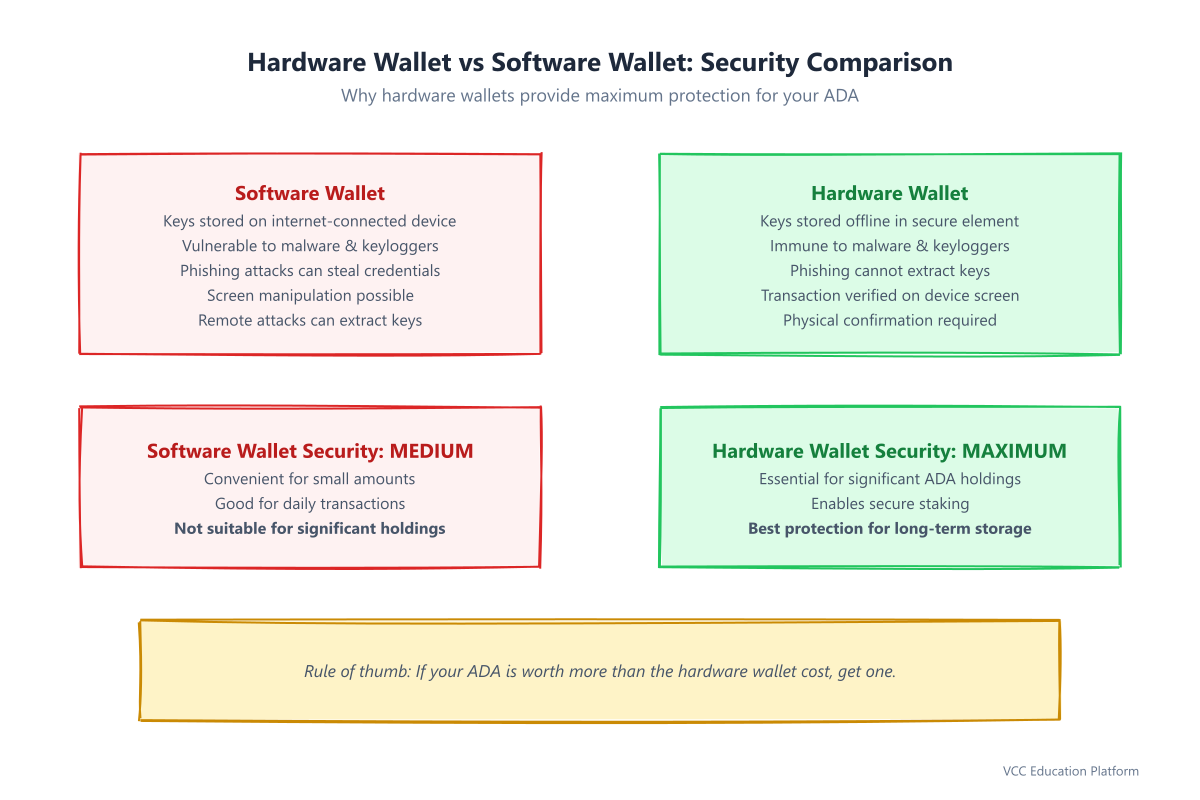
Figure 1: Hardware wallet vs software wallet — why offline key storage matters for ADA security
Why Use a Hardware Wallet for Cardano?
Cardano is known for strong security, but even a safe blockchain needs good key management. Here's why hardware wallets are important for ADA holders:
Protection Against Malware and Phishing Modern malware is clever. It can steal your passwords, record your keystrokes, and even change what you see on your screen. Hardware wallets beat these attacks because transaction details show up on the device's own screen, fully separate from your computer.
Defense Against Remote Attacks Even if someone gains remote access to your computer, they cannot steal your ADA. They need physical access to your hardware wallet. They might see your wallet address and balance, but they cannot start transactions without your physical confirmation.
Peace of Mind for Long-Term Holders If you plan to hold your ADA for years, a hardware wallet is essential. It lets you store your assets safely without worrying about daily security threats or software bugs.
Staking Without Compromising Security Cardano's staking is one of its best features – you earn rewards by delegating ADA to stake pools. Hardware wallets let you stake while your keys stay secure. Delegate once, then earn rewards without constantly exposing your wallet to risk.
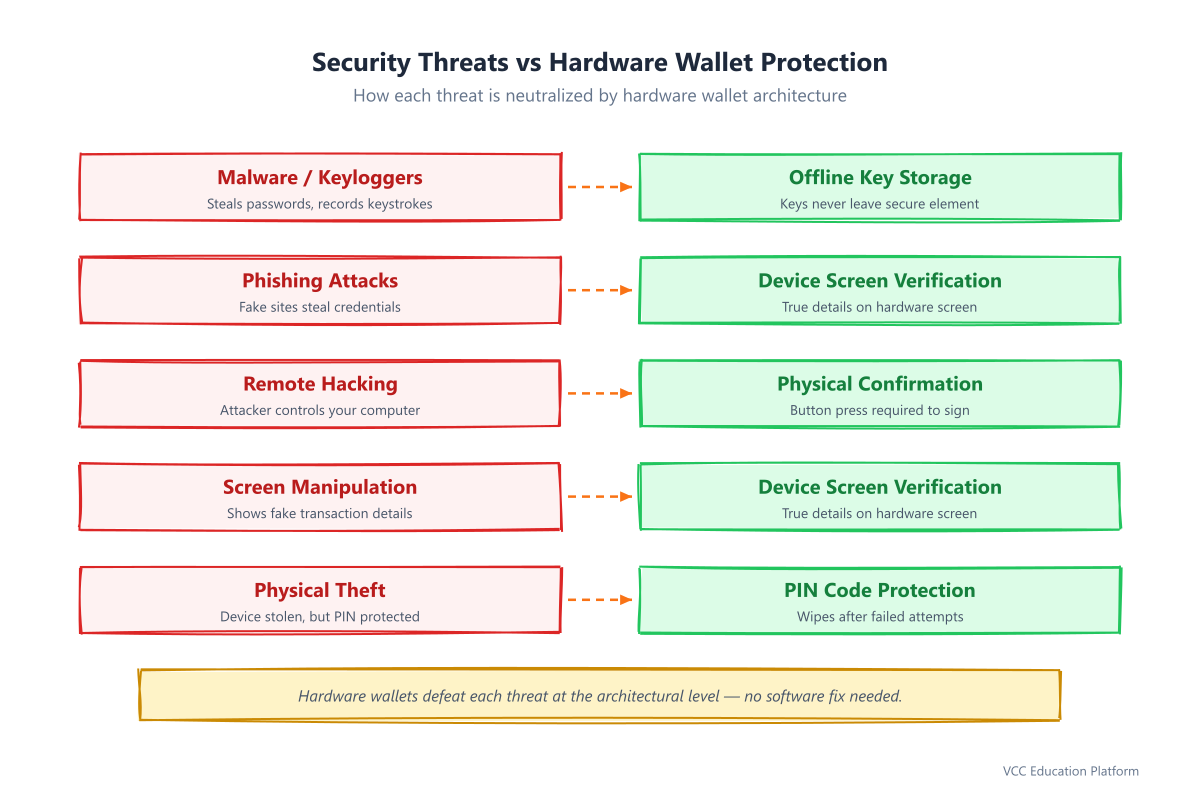
Figure 2: Every major threat neutralized by hardware wallet architecture
Popular Hardware Wallets for Cardano
Looking for the best hardware wallet for cardano? Several devices support Cardano, each with its own strengths. Here are the most popular options:
Ledger Devices
Ledger Nano X (~$149)
- Bluetooth for mobile use.
- Large storage (100+ apps).
- USB-C connection.
- Great mobile app support.
Ledger Nano S Plus (~$79)
- Budget-friendly.
- USB-C connection.
- Good storage (100+ apps).
- Perfect for beginners.
Trezor Devices
Trezor Model T (~$179)
- Full-color touchscreen.
- Open-source software.
- Advanced security features.
- Great for tech-savvy users.
Trezor One (~$59)
- Most affordable option.
- Two-button navigation.
- Proven security record.
- Solid entry-level device.
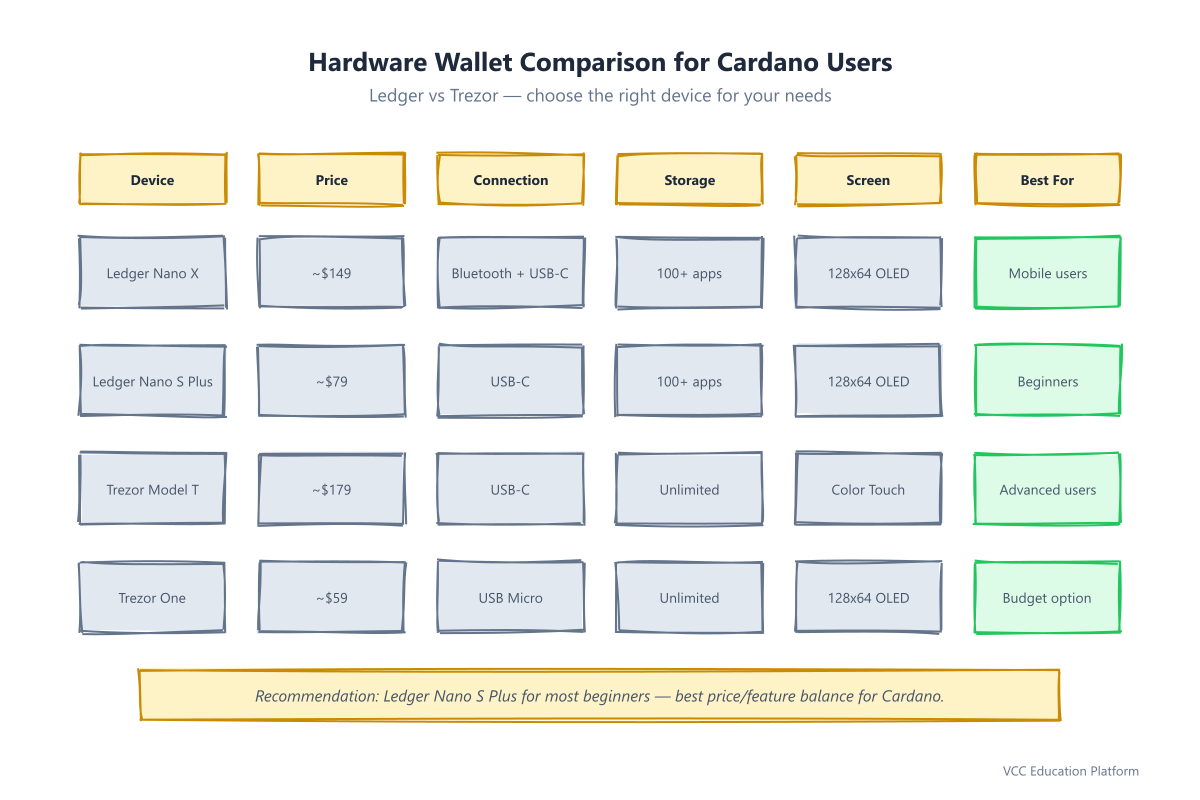
Figure 3: Ledger vs Trezor — which hardware wallet fits your Cardano needs
Which One Should You Choose?
For most Cardano beginners, the Ledger Nano S Plus offers the best balance of price, features, and ease of use. If you plan to use your wallet often with mobile devices, the Nano X is worth the extra cost. If you prefer open-source solutions and don't mind a higher price tag, the Trezor Model T is an excellent choice. In short, both a ledger cardano setup and a trezor cardano setup give you the same core protection. Pick the device that fits your habits and budget.
Setting Up Your Hardware Wallet
Setting up a hardware wallet is simple, but you must follow each step carefully. This is where most security mistakes happen, so pay close attention.
Step 1: Initial Setup
- Buy your hardware wallet from the official manufacturer's website or an authorized retailer. Avoid third-party sellers on marketplaces – fake devices exist.
- Connect your device to your computer using the provided USB cable.
- Visit the official manufacturer's website to download the setup software. Never use software from unofficial sources.
- Follow the on-screen instructions to initialize your device.
Step 2: Create Your PIN Code
Your hardware wallet will ask you to create a PIN code. This is your first line of defense if someone steals your device.
- Choose a PIN that's not obvious (avoid 1234, 0000, or your birth year).
- Use a combination you can remember but others wouldn't guess.
- The device will typically require 4-8 digits.
- After too many wrong attempts, the device wipes itself for security.
Step 3: Backup Your Recovery Phrase (CRITICAL!)
This is the most important step. Your cardano hardware wallet will display a series of words (usually 12 or 24). This is your recovery phrase, also called a seed phrase.
Write these words down exactly as they appear, in the exact order.
- Use the provided recovery sheet or write them on paper.
- Never store this phrase digitally (no photos, no cloud storage, no password managers).
- Make at least two copies and store them in separate, secure places.
- Consider a metal backup for fire and water protection.
- Never share this phrase with anyone, ever.
If you lose your hardware wallet, this recovery phrase is the only way to restore your ADA. If you lose the phrase, your ADA is gone forever.
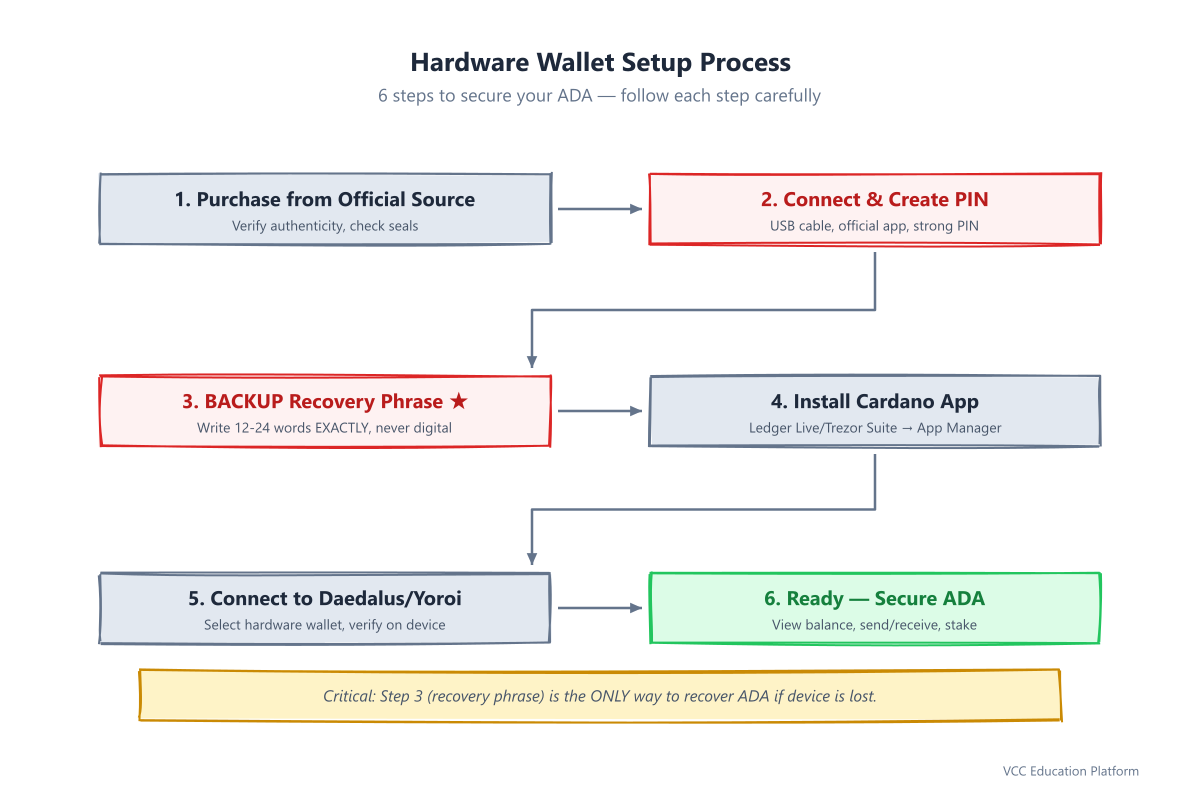
Figure 4: Step-by-step setup — pay special attention to Step 3 (recovery phrase backup)
Step 4: Install the Cardano App
Most hardware wallets use an app system. You'll need to install the Cardano app on your device:
- Open the manufacturer's desktop app (Ledger Live or Trezor Suite)
- Go to the app manager or app catalog
- Find and install the Cardano app
- Wait for installation to finish
Step 5: Connect to Cardano Wallet
Now you can connect your hardware wallet to Cardano's official wallets:
For Daedalus (Full Node Wallet):
- Download Daedalus from the official Cardano website
- Install and open Daedalus
- Choose "Create a new wallet" or "Restore wallet"
- Select "Hardware wallet" as the wallet type
- Follow the prompts to connect your device
- Verify the connection on your hardware wallet's screen
For Yoroi (Light Wallet):
- Download Yoroi from the official Cardano website
- Install the Yoroi browser extension
- Create a new wallet and select "Hardware wallet"
- Choose your hardware wallet manufacturer
- Connect your device and follow the setup wizard
Once connected, you can view your balance, send and receive ADA, and delegate to stake pools. All while your keys stay secure on your hardware wallet. See our guide on using Daedalus with hardware wallet for more detail.
Security Best Practices
Owning a hardware wallet is just the first step. The Cardano Foundation security guidelines recommend the practices below, and following them keeps your ADA safe:
Recovery Phrase Security
- Never share your recovery phrase with anyone, including customer support.
- Never enter it into websites or apps.
- Never take photos of it or store it digitally.
- Store copies in different physical places (home, safety deposit box, trusted family member).
- Consider a specialized metal backup for maximum durability.
PIN Code Management
- Use a strong, unique PIN.
- Don't reuse PINs from other devices.
- Change your PIN if you suspect it might be compromised.
- Never share your PIN with anyone.
Transaction Verification
Always verify transaction details on your hardware wallet's screen before confirming:
- Check the recipient address character by character.
- Verify the amount being sent.
- Confirm the transaction fee.
- Only press confirm when everything matches your expectations.
Firmware Updates
Regularly update your hardware wallet's firmware:
- Enable automatic updates if available.
- Check for updates monthly.
- Only install updates from official sources.
- Verify the update on your device screen before installing.
Purchase Safety
- Always buy from official manufacturer websites.
- Avoid second-hand devices.
- If buying from a retailer, verify they're authorized.
- Check for tamper-evident packaging seals.
- Initialize the device yourself upon receipt.
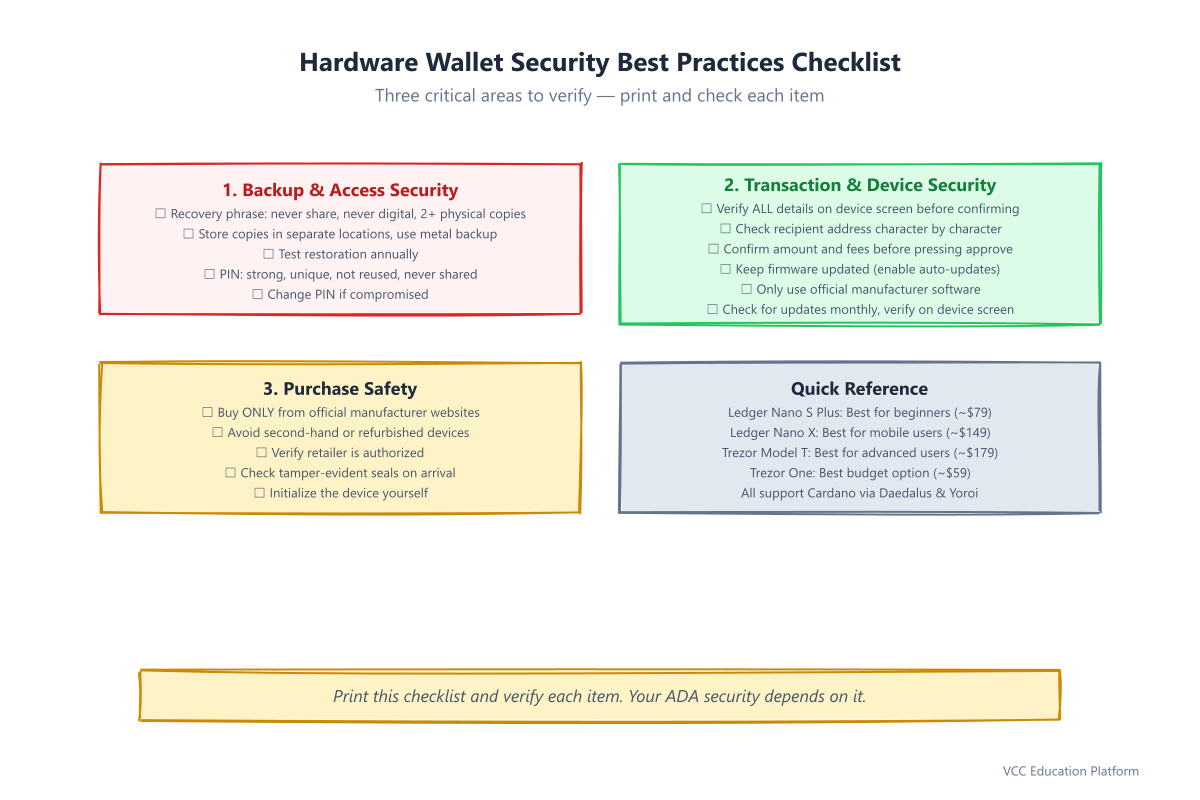
Figure 5: Print this checklist and verify every item — your ADA security depends on it
Common Mistakes to Avoid
Even experienced users make mistakes. Learn from these common errors:
Sharing the Recovery Phrase
The number one mistake is sharing your recovery phrase. No legitimate service will ever ask for it. If someone claims to be from support and asks for your recovery phrase, it's a scam.
Poor Backup Storage
Writing your recovery phrase on a sticky note and leaving it on your desk is asking for trouble. Store backups in secure, private places. Consider fireproof and waterproof options.
Ignoring Firmware Updates
Firmware updates often include critical security patches. Skipping updates leaves you open to known exploits.
Buying from Unofficial Sources
Fake hardware wallets are a real threat. They may look identical but contain malicious software that steals your keys. Always buy direct from the manufacturer.
Not Testing Recovery
Many people never test their recovery phrase until they need it. Test the restoration process once a year to ensure your backup works.
Forgetting PIN Codes
If you forget your PIN, you can restore your wallet using your recovery phrase. But if you forget both, your ADA is lost forever. Keep your PIN accessible but secure.
Frequently Asked Questions
Is a hardware wallet worth it for Cardano?
Yes, if you hold a meaningful amount of ADA. A cardano hardware wallet protects your keys from malware, phishing, and remote hacks for a one-time cost of $60-$180. For long-term holders, it's the safest place to store ADA. The peace of mind is worth the price.
Can you stake ADA with a hardware wallet?
Yes. Both Daedalus and Yoroi support staking with a hardware wallet. You delegate your ADA to a stake pool, and your keys never leave the device. Your ADA stays locked in staking while you earn rewards. You can still send funds if needed.
What happens if you lose your hardware wallet?
Nothing, as long as you have your recovery phrase. Buy a new device, enter your recovery phrase, and your ADA is restored. Without the phrase, your ADA is gone forever. That's why backing up the recovery phrase is the most important step.
Which is better for Cardano: Ledger or Trezor?
Both work well with Cardano. Ledger offers more storage and mobile Bluetooth (Nano X). Trezor uses open-source software with a touchscreen (Model T). For most beginners, the Ledger Nano S Plus is the best value for Cardano.
How much does a Cardano hardware wallet cost?
Expect to pay $59-$179. The Trezor One starts around $59, the Ledger Nano S Plus around $79, the Ledger Nano X around $149, and the Trezor Model T around $179. Prices vary by retailer. Official stores run sales throughout the year.
Conclusion
Hardware wallets provide the highest level of security for storing your ADA. They protect against malware, phishing, and remote attacks while giving you full control over your assets. The initial setup needs care, especially when backing up your recovery phrase. The peace of mind is worth the effort.
Remember these key points:
- Your recovery phrase is the most important thing – guard it with your life.
- Hardware wallets are essential for holding significant amounts of ADA.
- Regular security maintenance keeps your assets safe.
- Buy from official sources and verify everything on your device screen.
Whether you're holding ADA for the long term or actively trading, a hardware wallet is a smart investment in your cryptocurrency security. Take the time to set it up properly and follow best practices. Then sleep soundly knowing your ADA is protected by the best security available.