
Have you ever sent ADA and wondered, "Where exactly is my money right now?" or "When will it actually arrive?" In the world of cryptocurrency, you don't have to take your wallet's word for it. You can verify everything yourself using a cardano explorer.
Think of a blockchain explorer as the "Google of the blockchain." It is a public search engine that allows anyone to look up real-time data from the Cardano ledger without needing to run their own technical node. Whether you are verifying a payment, checking a stake pool's performance, or simply auditing your own transaction history, the explorer is your primary tool for transparency.
What is a Cardano Blockchain Explorer?
At its core, a blockchain explorer is a web-based interface that reads data from the Cardano blockchain and presents it in a human-readable format. Because Cardano is a public ledger, every single transaction ever made is recorded forever. The explorer simply indexes this data so you can search for it using a specific ID or address.
The primary purpose of an explorer is trustless verification. Instead of trusting a third-party app or a centralized exchange to tell you that a transaction was "successful," you can see the transaction actually etched into a block on the network.
Key functions of a cardano explorer include:
- Tracking Addresses: See the current ADA balance and full history of any public wallet address.
- Verifying Transactions: Confirm that a specific amount of ADA moved from point A to point B.
- Monitoring Network Health: View the current epoch, slot numbers, and total network value.
Top Cardano Explorers to Use
While there are many tools available, a few have become the industry standard for the community. When choosing the best cardano explorer, look for a balance of speed, UI clarity, and data depth.
- Cardanoscan: Likely the most popular community-driven explorer. It offers a clean interface and deep integration with stake pool data.
- AdaScan: Known for high performance and fast indexing, making it excellent for tracking very recent transactions.
- Blockfrost/Koios: While these are primarily APIs for developers, they power many of the explorers you use. If you are a developer, these are your go-to sources for raw data.
Step-by-Step: How to Track a Cardano Transaction
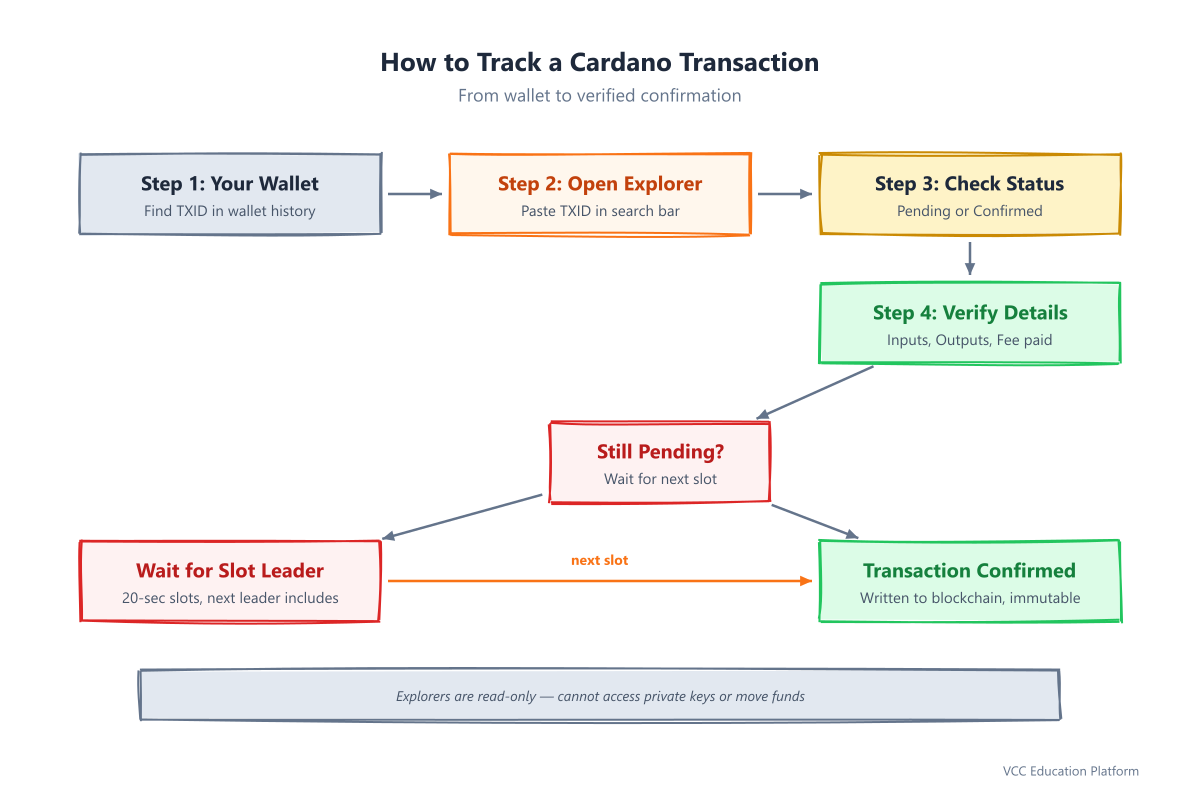
Tracking a transaction is the most common use case for a block explorer. Here is how to do it correctly.
1. Find your Transaction ID (TXID)
Every transaction on Cardano has a unique "fingerprint" called a Transaction ID (or TXID). This is a long string of alphanumeric characters. You can find this in your wallet (like Yoroi, Eternl, or Daedalus) under the "History" or "Details" tab of a specific transaction.
2. Enter the TXID into the Search Bar
Open your chosen cardano block explorer and paste the TXID into the main search bar. Hit enter.
3. Interpret the Results
Once the page loads, you will see several key pieces of information:
- Status: If it says "Pending," the transaction is still in the mempool awaiting a slot leader. If it says "Confirmed," it has been officially written into a block.
- Inputs & Outputs: You will see where the ADA came from (Inputs) and where it went (Outputs).
- Amount: The amount will be shown in ADA. Note that some explorers also show Lovelace (the smallest unit of ADA; 1 ADA = 1,000,000 Lovelace).
- Fees: You can see exactly how much ADA was paid to the network to process the transaction.
Understanding Address and Block Data
Beyond individual transactions, you can use a cardano explorer to dive deeper into the network's architecture.
Looking up an ADA Address
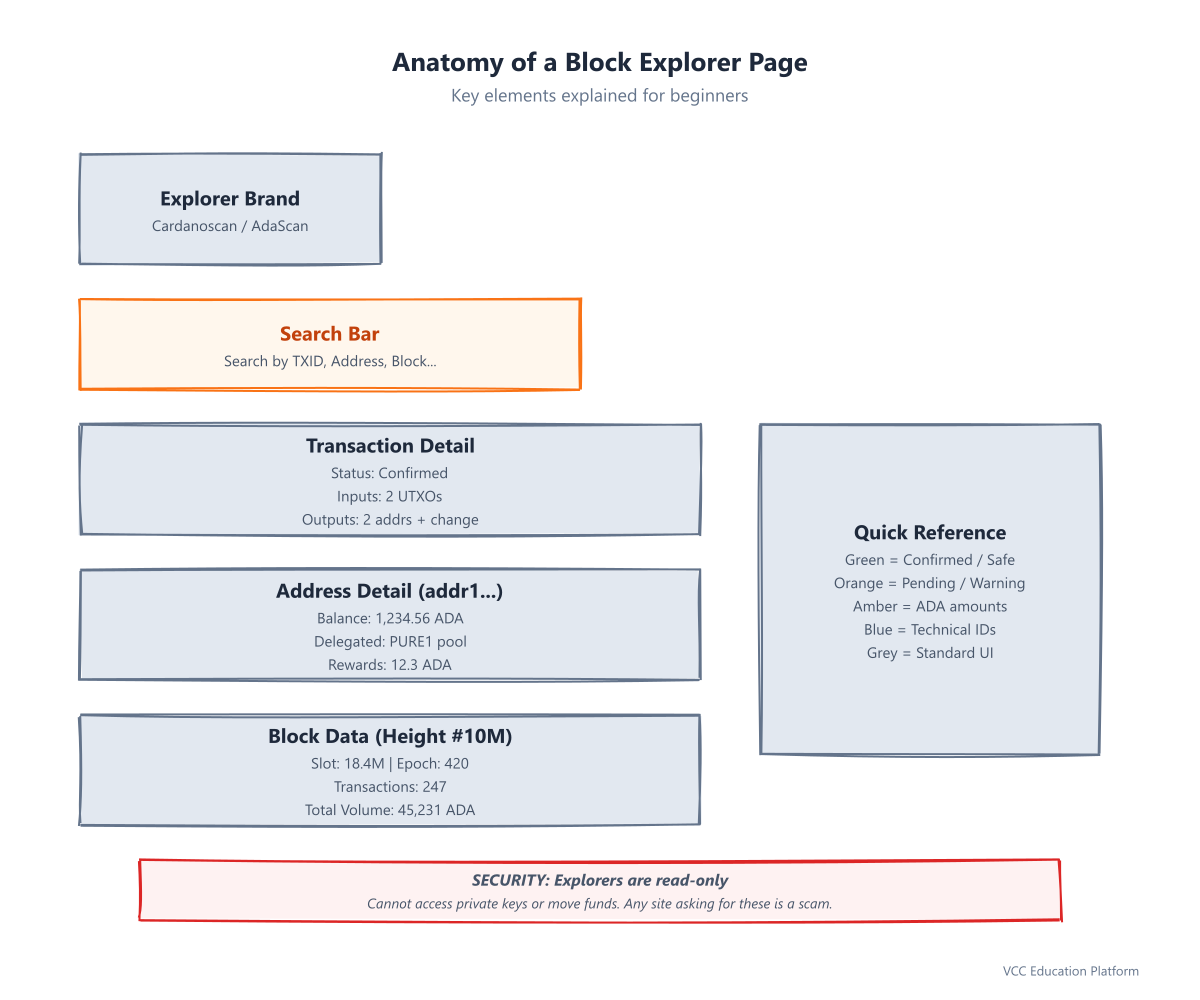
By pasting a public wallet address (starting with addr1...) into the search bar, you can see:
- Current Balance: The total amount of ADA currently held.
- Transaction History: A chronological list of every "In" and "Out" movement.
- Staking Info: Which stake pool the address is delegated to and whether it is currently earning rewards.
Reading Block Data
If you search for a block number (height), you are looking at a "snapshot" of the network at a specific moment.
- Slot Number: Cardano uses slots (20-second windows) instead of traditional block times.
- Epoch: A collection of slots (typically 5 days). This is the primary timeframe for staking rewards.
- Transactions per Block: See how many other users were transacting at the exact same time as you.
FAQ: Common Cardano Explorer Questions
Why is my transaction not showing up yet? Your transaction might still be "Pending." This happens if the network is congested or if the transaction is awaiting the next available slot leader to include it in a block.
Is it safe to put my public address into an explorer? Yes. A blockchain explorer only requires your public address. Public addresses are designed to be shared; they allow people to send you money and allow you to verify your balance.
Can I see my private keys on an explorer? Absolutely not. A blockchain explorer never has access to your private keys or seed phrase. If any website claiming to be an "explorer" asks for your private key or recovery phrase, it is a scam. Explorers are read-only tools; they can see what is on the blockchain, but they cannot move funds.
Internal Links:
- To learn more about managing your history, see Transaction history tracking.
- For a deeper dive into the data, read about Reading block data.
- To understand the timing of your transactions, check Understanding epochs and slots.